-
![]()
Advanced Product Options Suite
A feature-rich and highly customizable solution to set and manage Magento product options. Display your product variations beautifully and accurately. -
![]()
SEO Suite Ultimate
The pioneer Magento SEO extension, instantly enhanced and updated to comply with the continuous changes in the SEO world. All-in-one Adobe Commerce SEO toolkit. -
![]()
Shipping Suite
All you could possibly need to build a Magento shipping system. Shipping methods, rates, carriers, shipping cost calculator, zip code validation. -
![]()
Ultimate Sales Boost
Need to give your Magento store an ultimate sales boost? Build urgency, scarcity, and trust with the help of countdown timers, products popularity popups, stock status, etc. -
![]()
Order Management
Magento delete orders functionality. Editing any order details without having to cancel orders. Adding 28 extra order parameters and 20 extra order mass actions. Staff access levels. -
![]()
Store Locator & In-Store Pickup
Magento 2 Store Locator extension to introduce BOPIS. No-contact delivery. Curbside pickup. Items’ availability tracking. Store locations on Google Maps. -
![]()
Checkout Suite
Magento One Page Checkout extension to introduce a delivery-oriented checkout flow. Comes with integrated Delivery Date and Store Locator & In-Store Pickup. -
![]()
Delivery Date & Time
All you need to display estimated shipment dates in your Magento-based store. Checkout page delivery. Shipping date restrictions and extra charges for specific time slots. -
![]()
Customer Prices Suite
The toolkit to personalize Magento prices and discounts. Shopper- and group-specific customer prices. Individual and group promotions. Updating prices in bulk.


-
![]()
FAQ
Create and manage FAQ sections for Magento 2 product pages, category pages, and CMS pages. Improve customer experience, reduce support requests, support AI-ready content, and add FAQ schema markup via Mageworx SEO Suite. -
![]()
AI Product Compare
Add AI-powered product comparison to Magento 2 with OpenAI ChatGPT and Google Gemini. Help shoppers quickly understand product similarities, key differences, pricing, and recommendations — all in a clear, decision-ready format. -
![]()
Shipping Suite
All you could possibly need to build a Magento shipping system. Shipping methods, rates, carriers, shipping cost calculator, zip code validation. -
![]()
SEO Suite Ultimate
The pioneer Magento SEO extension, instantly enhanced and updated to comply with the continuous changes in the SEO world. All-in-one Adobe Commerce SEO toolkit. -
![]()
Advanced Product Options Suite
A feature-rich and highly customizable solution to set and manage Magento product options. Display your product variations beautifully and accurately. -
![]()
Gift Cards
Online and offline Magento 2 gift card giving made easy. Flexible pricing schemes, multi-store gift cards, flexible pricing configuration possibilities. -
![]()
Multi Fees
Magento 2 extra fee extension that allows you to set up any Magento fee, including product, shopping cart, shipping methods, license, handling, and transaction fees. -
![]()
Reward Points
Build a Magento 2 reward points program that works! Reward your most active and loyal customers, motivate hesitating ones and generate more profit for each order. -
![]()
Store Locator & In-Store Pickup
Magento 2 Store Locator extension to introduce BOPIS. No-contact delivery. Curbside pickup. Items’ availability tracking. Store locations on Google Maps.


-
![]()
Store Locator & In-Store Pickup
Magento 2 Store Locator extension to introduce BOPIS. No-contact delivery. Curbside pickup. Items’ availability tracking. Store locations on Google Maps. -
![]()
Gift Cards
Online and offline Magento 2 gift card giving made easy. Flexible pricing schemes, multi-store gift cards, flexible pricing configuration possibilities. -
![]()
Multi Fees
Magento 2 extra fee extension that allows you to set up any Magento fee, including product, shopping cart, shipping methods, license, handling, and transaction fees. -
![]()
Reward Points
Build a Magento 2 reward points program that works! Reward your most active and loyal customers, motivate hesitating ones and generate more profit for each order. -
![]()
Shipping Suite
All you could possibly need to build a Magento shipping system. Shipping methods, rates, carriers, shipping cost calculator, zip code validation. -
![]()
Advanced Product Options Suite
A feature-rich and highly customizable solution to set and manage Magento product options. Display your product variations beautifully and accurately.
-
![]()
SEO Suite Ultimate
The pioneer Magento SEO extension, instantly enhanced and updated to comply with the continuous changes in the SEO world. All-in-one Adobe Commerce SEO toolkit. -
![]()
Advanced Product Reviews & Reminders
Use Magento 2 Review Reminder to increase trust in your brand by transforming Magento 2 reviews into advanced product feedback. Trigger email/popup review reminders. -
![]()
AI Product Compare
Add AI-powered product comparison to Magento 2 with OpenAI ChatGPT and Google Gemini. Help shoppers quickly understand product similarities, key differences, pricing, and recommendations — all in a clear, decision-ready format. -
![]()
FAQ
Create and manage FAQ sections for Magento 2 product pages, category pages, and CMS pages. Improve customer experience, reduce support requests, support AI-ready content, and add FAQ schema markup via Mageworx SEO Suite.

-
![]()
FAQ
Create and manage FAQ sections for Magento 2 product pages, category pages, and CMS pages. Improve customer experience, reduce support requests, support AI-ready content, and add FAQ schema markup via Mageworx SEO Suite. -
![]()
SEO Suite Ultimate
The pioneer Magento SEO extension, instantly enhanced and updated to comply with the continuous changes in the SEO world. All-in-one Adobe Commerce SEO toolkit. -
![]()
Landing Pages
The Landing Pages Magento extension allows you to create SEO- and user-friendly landing pages for your marketing campaigns. Pages creation in bulk. -
![]()
Layered Navigation
A set of flexible features to make Magento layered navigation search engine and user-friendly. Advanced configuration of filter attributes. -
![]()
Extended Rich Snippets
Draw users' attention and win the click with more detailed Magento rich snippets. Developed according to the latest Google and Schema.org standards. -
![]()
SEO Meta Templates
The Magento 2 SEO Meta Tags Template module to optimize product and category page metadata, keywords, short and detailed descriptions. -
![]()
Cross Linking
All you need to create and manage Magento 2 cross-linking SEO. Internal links optimization on the product, category, and CMS pages. Linking to relevant external sources. -
![]()
Sitemap Suite
XML and HTML Magento 2 sitemaps to enhance your site’s crawling, indexation, and navigation. Magento 2 Cron for automatic sitemaps navigation. -
![]()
Short Category & Product URLs
Make product and category pages better crawled by the search engine spiders. Use the Magento Short URL extension to remove parent categories from URLs.


-
![]()
Shipping Suite
All you could possibly need to build a Magento shipping system. Shipping methods, rates, carriers, shipping cost calculator, zip code validation. -
![]()
Store Locator & In-Store Pickup
Magento 2 Store Locator extension to introduce BOPIS. No-contact delivery. Curbside pickup. Items’ availability tracking. Store locations on Google Maps. -
![]()
Delivery Date & Time
All you need to display estimated shipment dates in your Magento-based store. Checkout page delivery. Shipping date restrictions and extra charges for specific time slots. -
![]()
Shipping Table Rates
With our Magento 2 Shipping Table Rates extension, you can overcome the default limitations and create an unlimited number of carriers, methods, and shipping rates. -
![]()
Shipping Calculator on Product Page
Increase conversion rates and improve customer experience by letting your shoppers calculate the cost of shipping right on your product pages. Estimated shipping block. -
![]()
Green Delivery
This Green Delivery module helps quickly offer such an option in your Magento-based store. Multi-store and multi-language support. -
![]()
No-Contact Delivery / Curbside Pickup
This Free Curbside Pickup module helps quickly offer the no-contact delivery option in your Magento-based store. Multi-store and multi-language support.


-
![]()
Marketing & Sales Suite
There’s no better tool to tackle Magento 2 marketing automation than this suite. Rewards program, recent sales notifications, countdown timers, review reminders, discounts. -
![]()
Customer Prices Suite
The toolkit to personalize Magento prices and discounts. Shopper- and group-specific customer prices. Individual and group promotions. Updating prices in bulk. -
![]()
Gift Cards
Online and offline Magento 2 gift card giving made easy. Flexible pricing schemes, multi-store gift cards, flexible pricing configuration possibilities. -
![]()
Reward Points
Build a Magento 2 reward points program that works! Reward your most active and loyal customers, motivate hesitating ones and generate more profit for each order. -
![]()
Multi Fees
Magento 2 extra fee extension that allows you to set up any Magento fee, including product, shopping cart, shipping methods, license, handling, and transaction fees. -
![]()
Ultimate Sales Boost
Need to give your Magento store an ultimate sales boost? Build urgency, scarcity, and trust with the help of countdown timers, products popularity popups, stock status, etc. -
![]()
Advanced Product Reviews & Reminders
Use Magento 2 Review Reminder to increase trust in your brand by transforming Magento 2 reviews into advanced product feedback. Trigger email/popup review reminders. -
![]()
Product Countdown Timers
Magento 2 Countdown Timer extension to add beautifully visualized timers to your product pages. The module comes with 20+ highly customizable design templates. -
![]()
Affiliate
Magento 2 Affiliate module helps you launch, run and manage flexible affiliate marketing programs. It allows you to effectively market your products with a low budget, low effort, and time while enjoying high ROI.


-
![]()
Advanced Product Options Suite
A feature-rich and highly customizable solution to set and manage Magento product options. Display your product variations beautifully and accurately. -
![]()
File Downloads and Product Attachments
Add any kind and any format of Magento 2 product attachments to your product pages―equip them with product videos, user guides, price lists, etc. -
![]()
Customer Prices Suite
The toolkit to personalize Magento prices and discounts. Shopper- and group-specific customer prices. Individual and group promotions. Updating prices in bulk. -
![]()
Customer Group Prices
Diversify your pricing strategy with custom Magento customer group prices. Set custom prices for wholesale and retail shoppers. Special deals for targeted groups. -
![]()
Prices per Customer
Add a personalized touch to your Magento pricing with the help of this Magento Price per Customer module. Mass update customer prices. Prices import/export. -
![]()
Product Custom Options Templates
Ease the pain of manual Magento custom options configuration. Create any number of custom options templates like color, size, dimensions, etc., in a few clicks. -
![]()
Shipping Calculator on Product Page
Increase conversion rates and improve customer experience by letting your shoppers calculate the cost of shipping right on your product pages. Estimated shipping block. -
![]()
Event Management by Staylime
Create, manage and sell Magento events. Let shoppers search for, wishlist, review any type of events as Magento products: conferences, concerts, parties, etc.


-
![]()
Order Management
Magento delete orders functionality. Editing any order details without having to cancel orders. Adding 28 extra order parameters and 20 extra order mass actions. Staff access levels. -
![]()
Order Editor
Magento edit order without canceling. Add, delete, and remove any order details, order customers' billing, payment, and shipping info. Order edit logs and staff permissions. -
![]()
Extended Orders Grid
Extend and customize the default Magento 2 orders grid. Easily add 28 extra colums with essential order parameters, perform order mass-actions, synch order data and more. -
![]()
Custom Order Number
Expand the native numbering scheme with the Magento 2 Custom Order Number module. Edit order length, add custom prefixes, increment prefixes, etc.


-
![]()
Affiliate
Magento 2 Affiliate module helps you launch, run and manage flexible affiliate marketing programs. It allows you to effectively market your products with a low budget, low effort, and time while enjoying high ROI. -
![]()
Ultimate Sales Boost
Need to give your Magento store an ultimate sales boost? Build urgency, scarcity, and trust with the help of countdown timers, products popularity popups, stock status, etc. -
![]()
Custom Order Number
Expand the native numbering scheme with the Magento 2 Custom Order Number module. Edit order length, add custom prefixes, increment prefixes, etc. -
![]()
Shop by Brand
Brands create desire, a sense of belonging, status, and prestige. Use Magento Shop by Brand to bridge the distance between your customers and their favorite offerings. -
![]()
Short Category & Product URLs
Make product and category pages better crawled by the search engine spiders. Use the Magento Short URL extension to remove parent categories from URLs. -
![]()
Personal Customer Discount
Motivate shoppers to complete a purchase with custom-tailored coupon codes & Magento discount per customer. Select customers for promotions. -
![]()
Landing Pages
The Landing Pages Magento extension allows you to create SEO- and user-friendly landing pages for your marketing campaigns. Pages creation in bulk. -
![]()
Checkout Suite
Magento One Page Checkout extension to introduce a delivery-oriented checkout flow. Comes with integrated Delivery Date and Store Locator & In-Store Pickup. -
![]()
Layered Navigation
A set of flexible features to make Magento layered navigation search engine and user-friendly. Advanced configuration of filter attributes.


-
![]()
Magento development
Full-cycle Magento 2 development taken care of. -
![]()
Magento migration
End-to-end migration from Magento 1 to Magento 2. -
![]()
Shopify development
Full-fledged Shopify store implementation. -
![]()
Magento maintenance & support
Ad hoc support and ongoing maintenance services for your store. -
![]()
Magento design
Unique Magento theme design and development. -
![]()
SEO Suite Ultimate configuration
Advanced configuration of our best-selling SEO extension.






Magento 2 FAQ Extension for AI Search

Magento 2 FAQ Extension for AI Search
Main features
Gallery
Version
1.0.7
Magento Compatibility
CE 2.4.x; EE 2.4.x


Comes with
- Lifetime access to the source code
- No subscriptions
- Paid support
Extensible. Customizable. Developer-friendly
Composer installation for easier extensions installation and management
No overwriting the core classes unless unachievable within a functionality
Unencrypted code for hassle-free editing if required by your clients
Extensions' code implementation following Magento's recommended best practices
FAQ Management
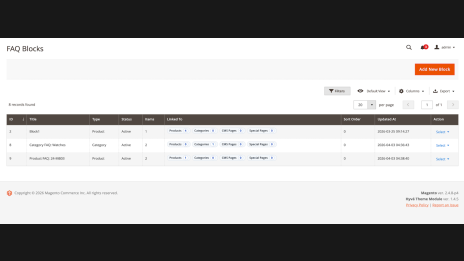
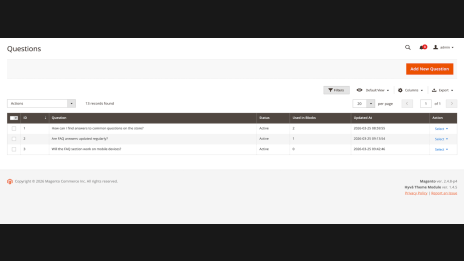
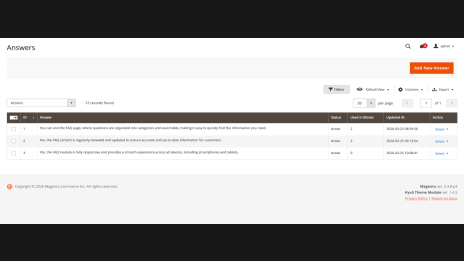
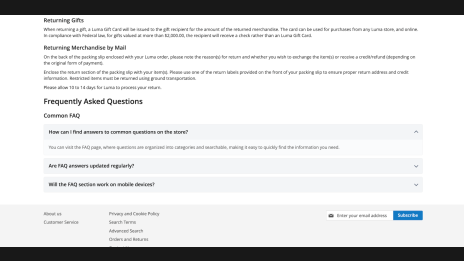
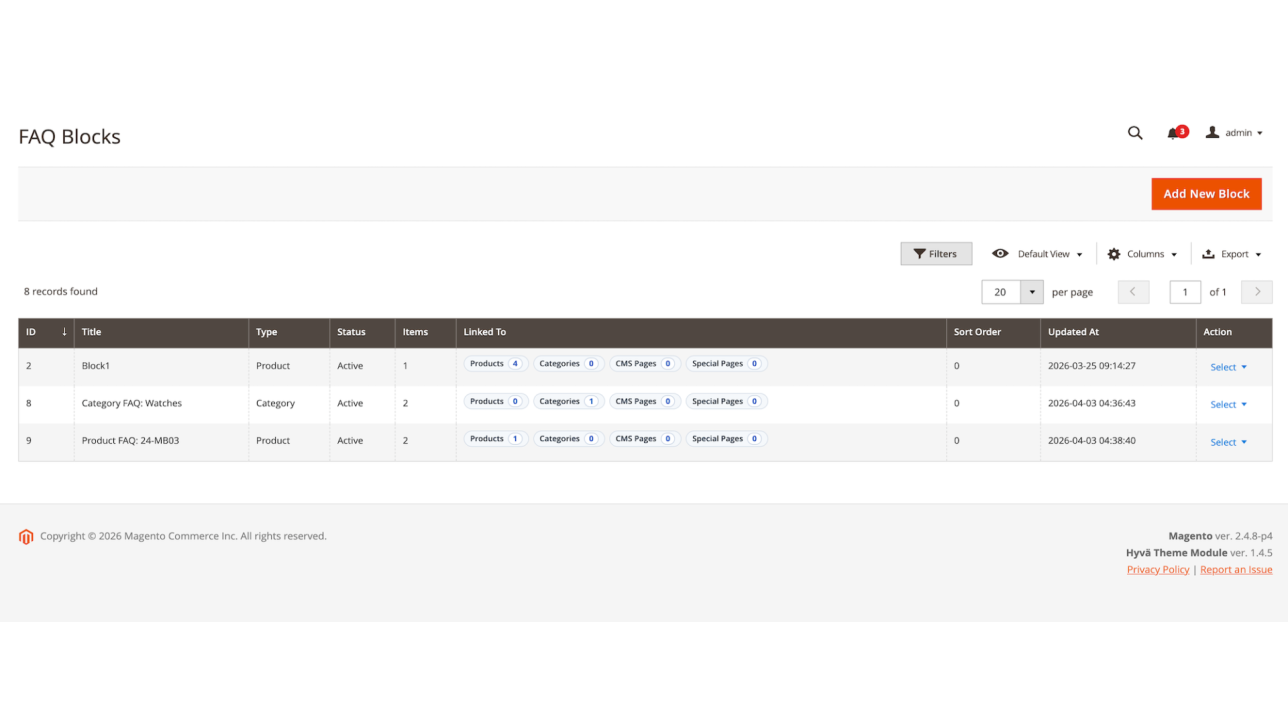
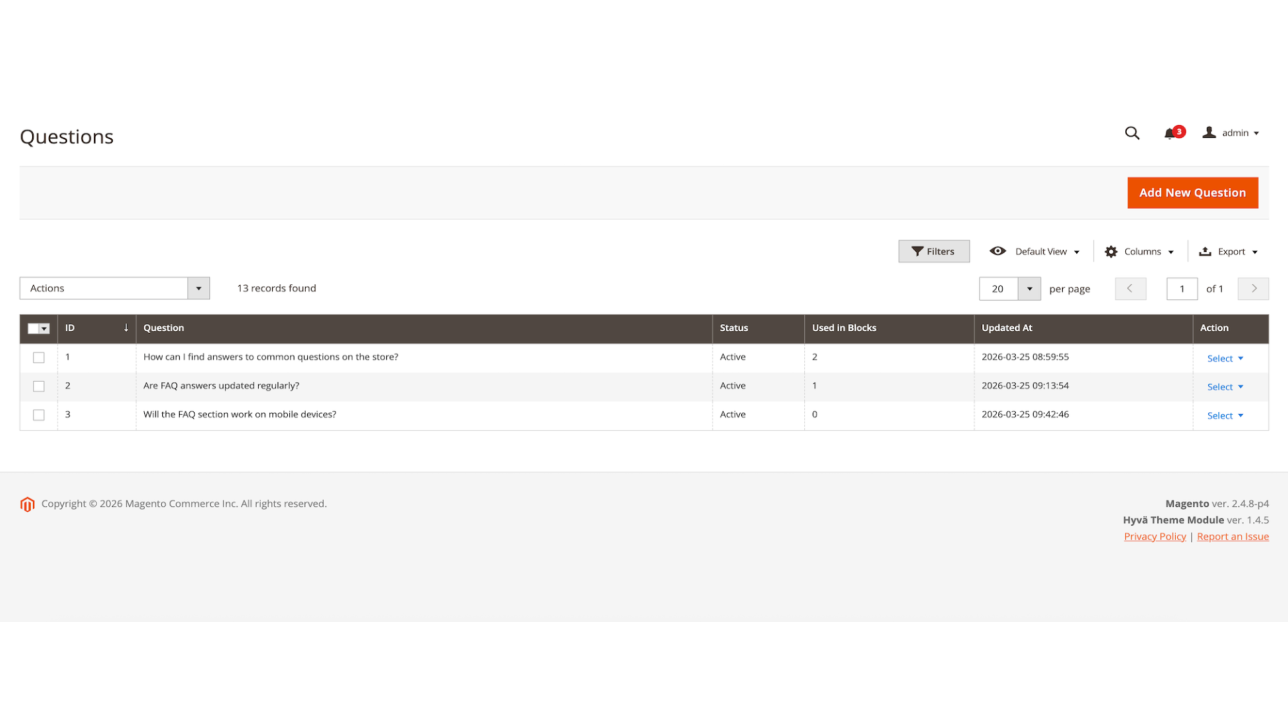
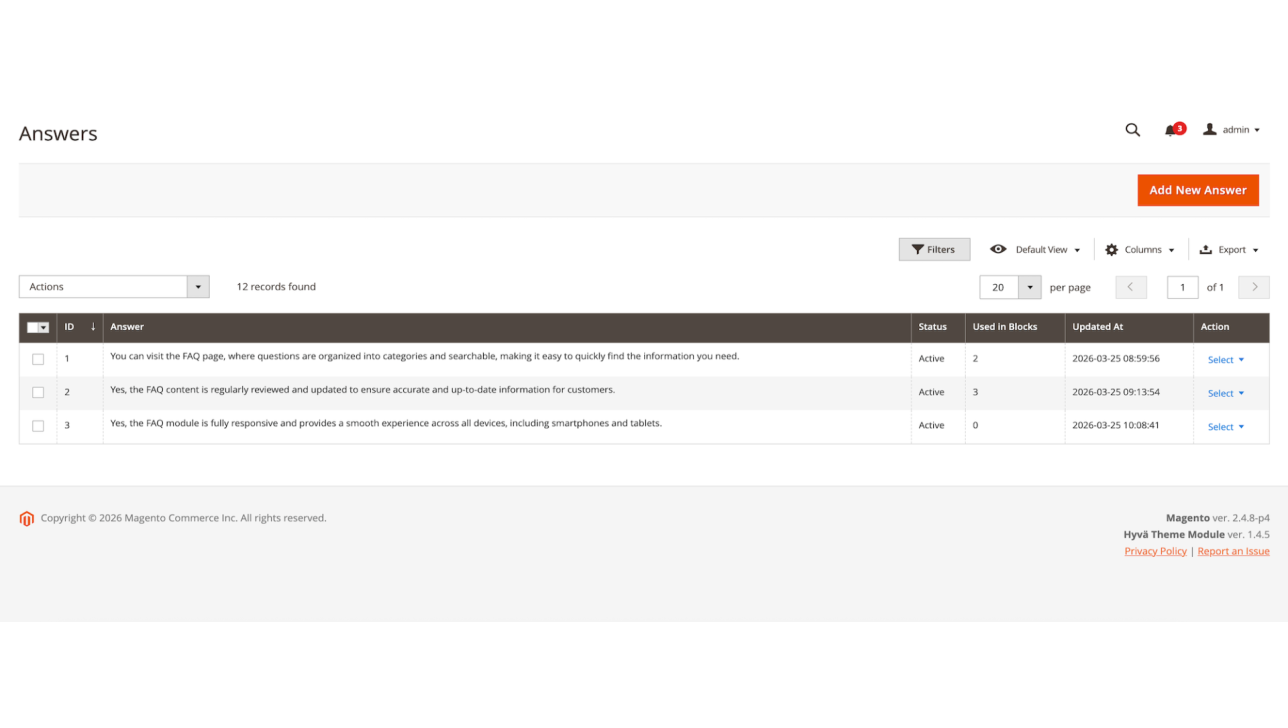
Create a structured FAQ knowledge base directly from your Magento 2 admin panel. Add questions, write detailed answers, organize content into FAQ blocks, and keep your customer-facing answers consistent across the store.
Magento 2 FAQ management lets you:
Instead of hiding valuable product and policy information in support chats, emails, or long text sections, you can turn it into reusable FAQ content that shoppers can access instantly.
Smart FAQ Placement
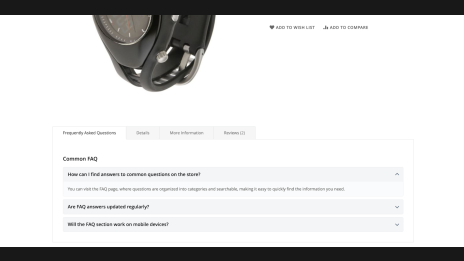
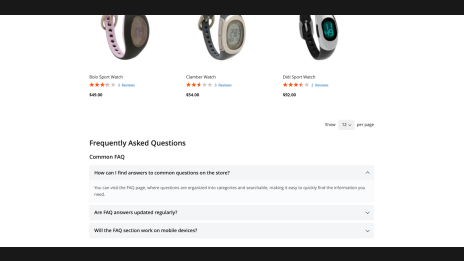
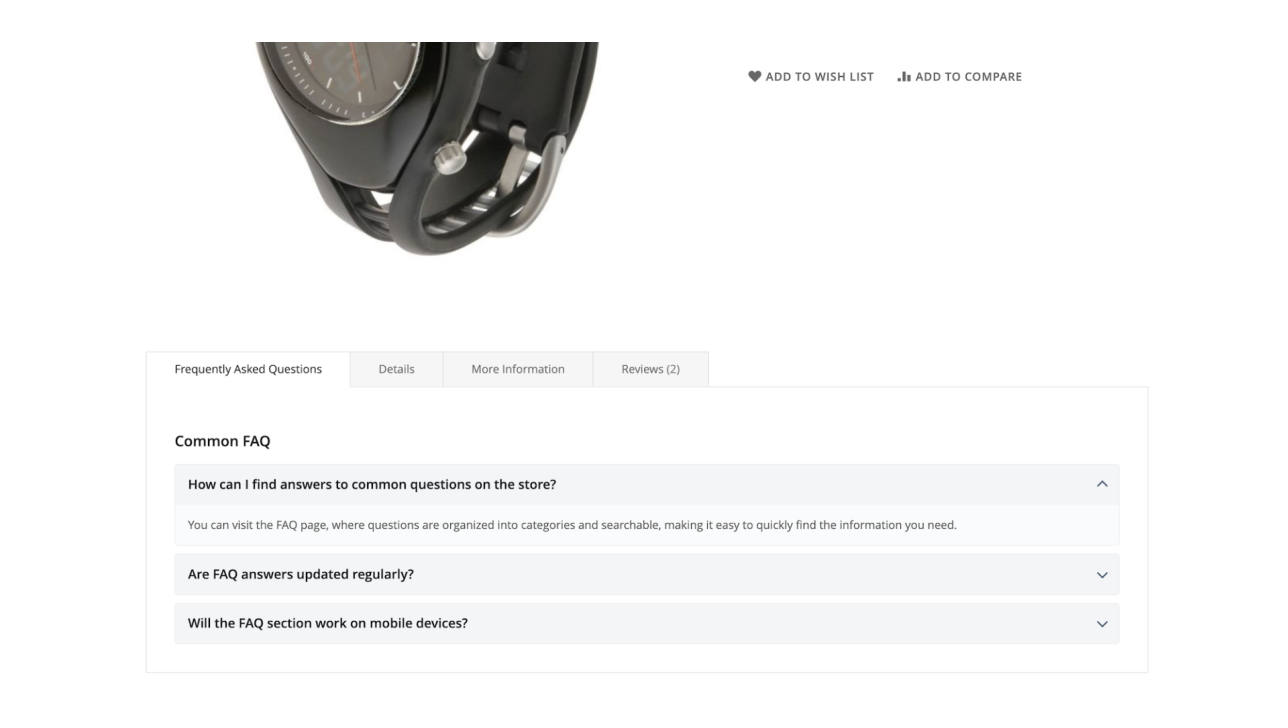
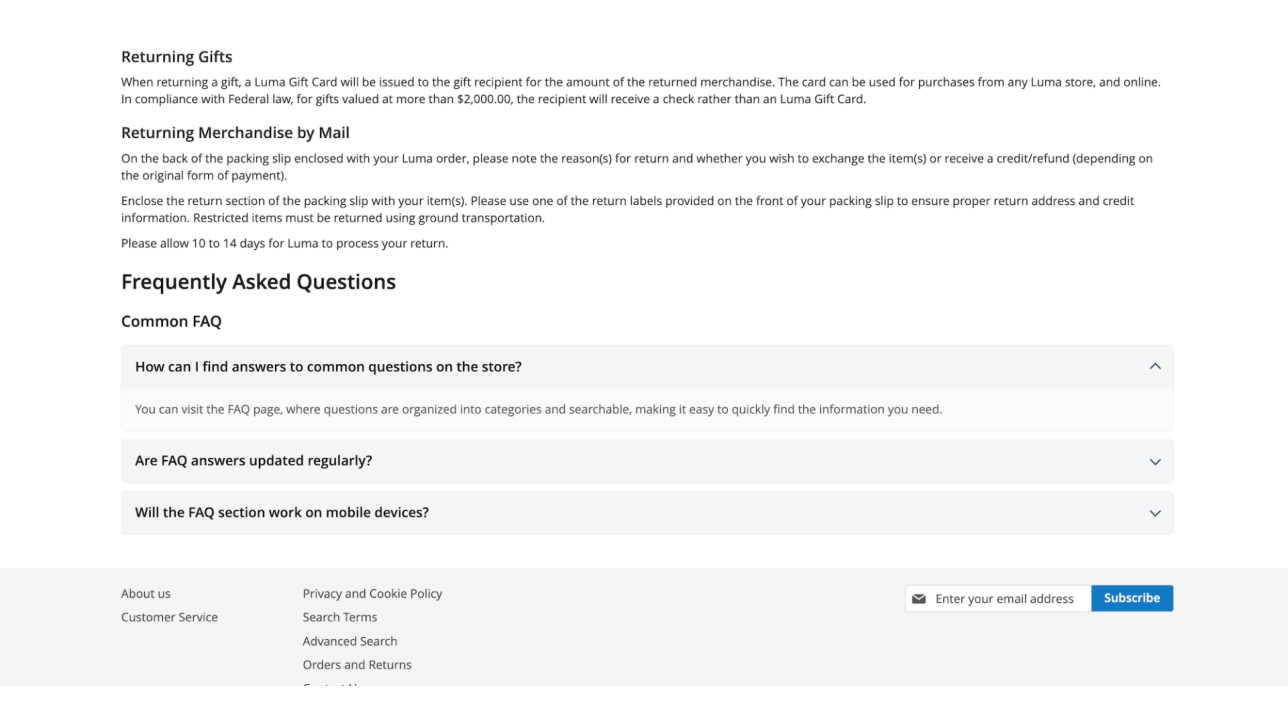
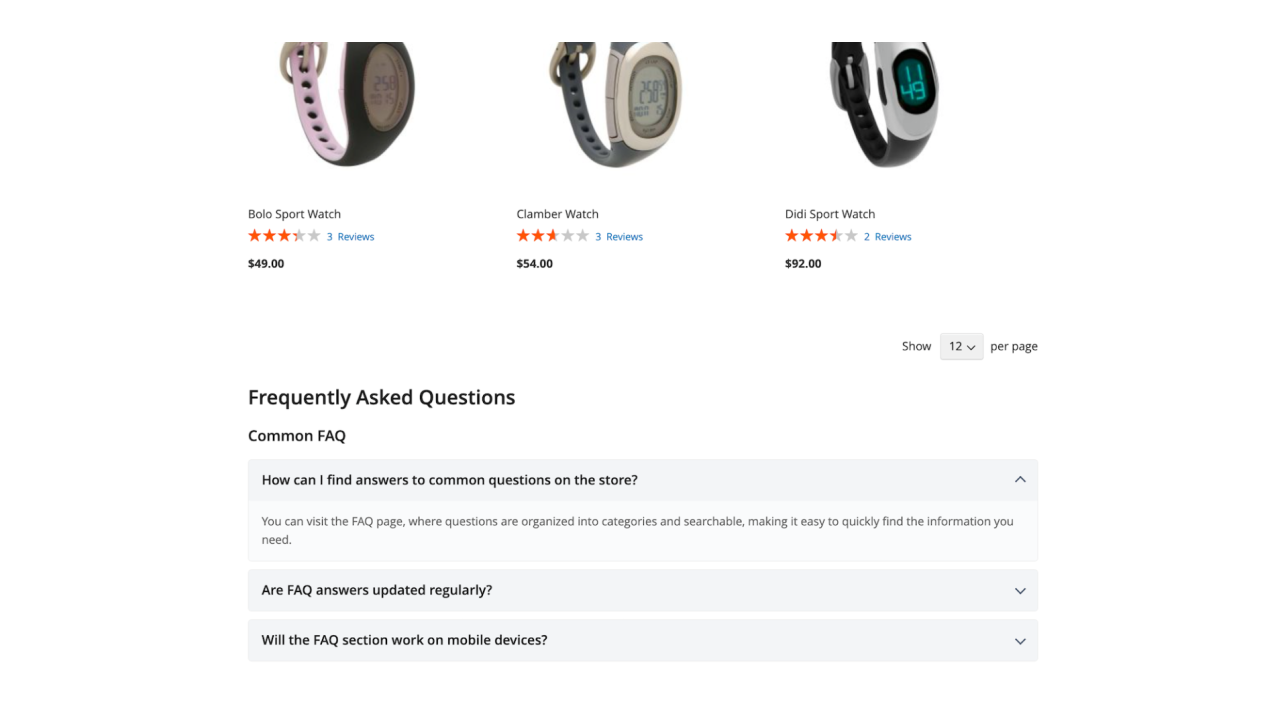
Show the right answers on the right pages. Product questions should appear on product pages, buying guide questions can support category pages, and policy or service questions may work better on CMS pages.
With Magento 2 FAQ extension, you’ll be able to:
FAQ content works best when it appears at the exact moment of doubt. A customer should not have to search the whole store to find an answer about size, compatibility, delivery, warranty, materials, or returns.
Customer Experience
Reduce hesitation with clean, easy-to-scan FAQ blocks. Shoppers rarely read everything — they scan, compare, hesitate, and look for quick reassurance.
Improve storefront UX with:
A good FAQ section does more than inform. It calms the buyer. When shoppers understand what they are buying, how it works, and what to expect, they are more likely to move forward with confidence.
AI Translation
Translate FAQ content faster with AI. For multilingual Magento 2 stores, every new question, answer, policy update, or product explanation may need to be translated across multiple store views.
AI translation helps you:
FAQ content is only useful if customers can understand it. AI-assisted translation helps Magento 2 merchants scale helpful Q&A content across languages without turning every small FAQ update into a large manual task.
Multi-Store & Multi-Language Support
Build FAQ content for complex Magento 2 setups. Many stores operate across multiple storefronts, languages, regions, brands, or customer segments. A simple FAQ setup is not enough when different audiences need different answers.
Use multi-store FAQ support to:
A good FAQ system should not force every storefront to say the same thing. Multi-store and multi-language support lets your FAQ content stay relevant for each market.
SEO & FAQ Markup
FAQ content is naturally valuable for SEO because it matches how people search: in questions. Customers ask about product fit, compatibility, delivery, returns, use cases, safety, materials, and comparisons before they buy.
FAQ content can help your Magento store:
About FAQ schema markup: FAQ Page structured data markup is available when the FAQ extension is used together with Mageworx SEO Suite Ultimate for Magento 2. With FAQ markup enabled through SEO Suite, your FAQ content can become more machine-readable and better structured for search engines.
AI-powered search systems do not just look for pages. They look for clear answers, entities, relationships, and context. Well-written FAQ content helps explain what your products are, who they are for, how they work, and what shoppers need to know before buying.
Hyvä Compatibility
Mageworx FAQ extension is compatible with Hyvä themes, so merchants using modern Magento 2 frontend architecture can add FAQ blocks without compromising storefront performance or user experience.
Hyvä compatibility helps you:
FAQ sections should make the store clearer, not heavier. With Hyvä compatibility, Magento merchants can add useful FAQ content while keeping the storefront fast, clean, and modern.
Need a custom feature?
Product changelog
1.0.7
August 28, 2026- Enhances FAQ block entity assignment grids for Products, Categories, and CMS Pages: adds the Assigned: Yes / No / Any filter, opens existing blocks on assigned rows, and keeps unsaved selections visible in the filter
- Fixes bulk assignment behaviour: Select All now applies to all matching rows, preserves selections across filter changes, and clearing every selection correctly removes all assignments
- Improves entity grid usability: readable category paths, product thumbnails, bookmarks and column controls, and POST-based grid data loading
1.0.6
July 22, 2026- Minor improvements
1.0.5
June 25, 2026- Fixes the issues with FAQ styles loading in case if it's disabled in the general settings
FAQ
General questions
The two most common payment methods are currently accepted―credit cards (all types) and PayPal. All the payment transactions are carried out in full compliance with the security and confidentiality requirements.
Yes, after the purchase you will receive the complete invoice with all necessary details, including our VAT number etc.
We offer four independent ways of Magento 2 extension installation:
- Via Composer
- By copying the code
- Via Magento Marketplace
- Via Mageworx own Repository
Mageworx extensions support Magento 2 Open Source (former Community), Commerce (former Enterprise) editions including Magento 2 Commerce Cloud platform.
Our own repository has been primarily intended to facilitate and speed up the process of Mageworx
extensions installation and update.
In order to work with the repository, you’ll need to have the Composer on the server first. This
is the package manager of the PHP software that allows you to update & install scripts on your
site.
According to the Mageworx License Agreement, you can use one copy of Mageworx software on one Magento production installation. Thus, separate Magento installations require purchasing separate licenses.
Please mind that the extensions are not domain related, i.e., if you run each website on one Magento installation, then one license can be used. However, if you've got several websites on different Magento installations, then you would need to purchase separate licenses for each of them.
Yes, you can install and set up any Mageworx extension on a test environment before making changes on your production site.
By default, all Mageworx Magento 2 extensions are tested on three most popular themes: Luma,
Ultimo, and Porto. However, some of our extensions are compatible with more 3rd party themes.
You can get in touch with our support team at [email protected] to confirm compatibility with the theme that you are currently using.
In the world where 45% of purchases are completed via mobile (according to Retail Dive), we find it crucial to test and optimize all Mageworx extensions for mobile friendliness.
Extension updates are available as long as your support & updates package is active.
Purchases made before February 1, 2022, reserve the right to access our Magento extensions updates free of charge for a lifetime.
Currently, the Mageworx Magento support team can be reached via:
Email at [email protected]
On-site form, which is available here
Live chat on any page
Database migration, migrating custom-built functionality and design, as well as migrating advanced
SEO
settings―these and other options are available within our one-stop migration service.
To get a quote, you’ll need to contact our Client Relations Manager.
We offer a 60-day money-back guarantee for Mageworx extensions that have been purchased via our site. Customer satisfaction and creating true value are our top priority!
Please note that this is except for those Magento 1 extensions that are intended to be upgraded to their Magento 2 versions within 30 days since the moment of M1 version purchase. In such a case, a refund will be applied solely to the Magento 2 extension version.
Please note that extensions purchased at Magento Marketplace are covered by the 25-day Marketplace Refund Policy.
Reward points, bulk & upgrade discounts―at Mageworx, we do our best to show appreciation to our
new and
existing customers. Joining the program is fast and easy. To start saving with us, you need to
create an
account.
By helping Mageworx promote our extensions, you can earn up to 50% on every order. To join the
affiliate
program, you need to create an account on our website.
Go to "My Profile ― Affiliates", then
complete and
verify your affiliate profile.
Feel free to drop us a line on the Support page if you have questions.