
Bundle BuilderGetting started
Installing the app
If you are new to this app, then navigate to the Bundle products listing page on the Shopify Apps store, and click the Add app button. You will be guided through the standard Shopify installation process, where you’ll be asked to give the app certain access permissions, and then approve the charge.
If you’ve never installed this app before, you will be given a free trial period, and the billing will start after the trial is over. If you uninstall the app before the trial ends, you will not be charged.
App activation
Section titled “App activation”After the app is downloaded, you need to make sure it’s activated on the target theme you are going to use the app for.
To do this, follow the steps:
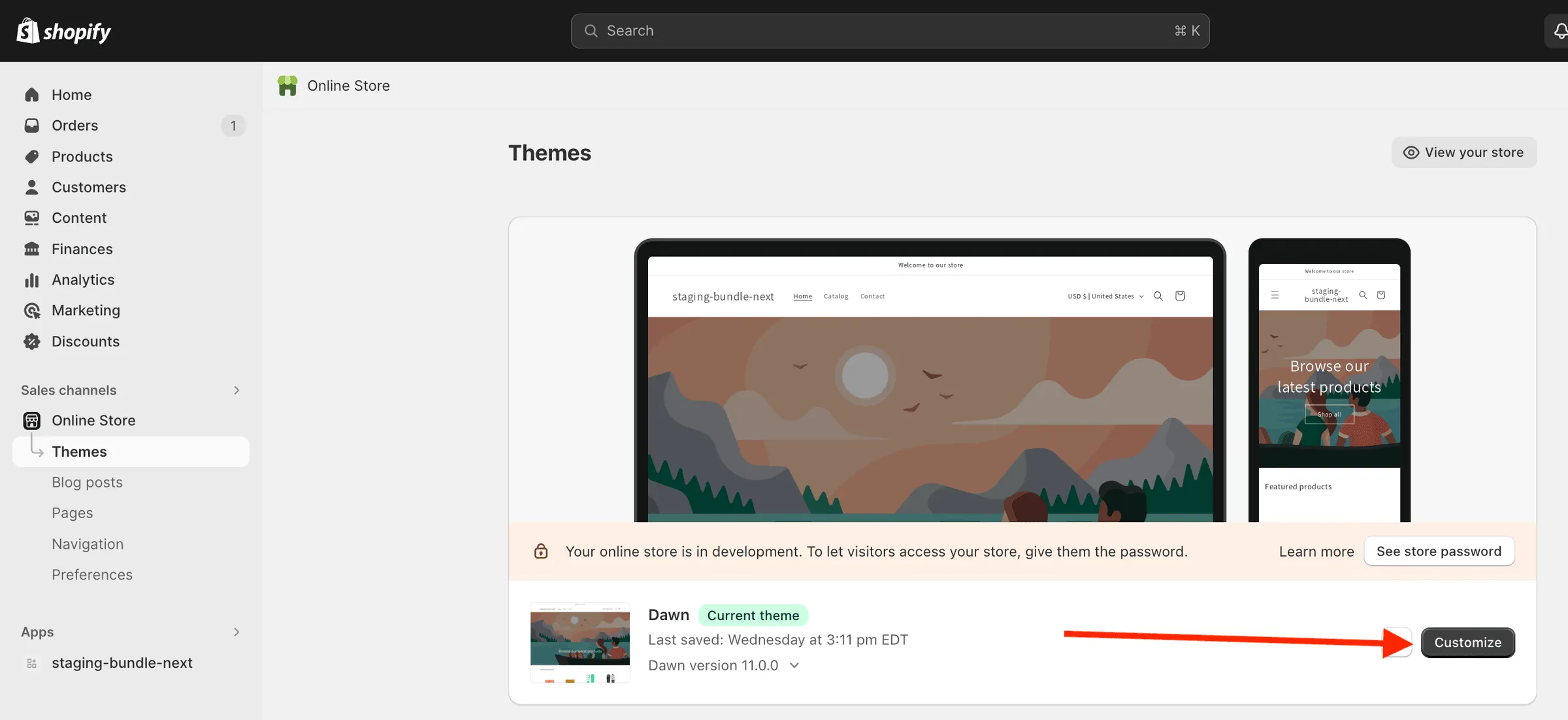
- go to Online store - Themes
- click Customize button for a theme, for which you want to enable the app
- go to App embeds section
- find Mageworx bundles app
- activate it
- Click Save.

Adding to a theme
Section titled “Adding to a theme”Once the app is activated in your theme, it’s necessary to add the app’s widget to the theme’s storefront to the desired placement to make it visible on your store’s storefront.
Themes 2.0
Section titled “Themes 2.0”For the themes 2.0 in order to add an app’s blocks to a storefront via Shopify theme customizer follow the steps:
1) go to Online store → Themes → click on Customize button for your theme:
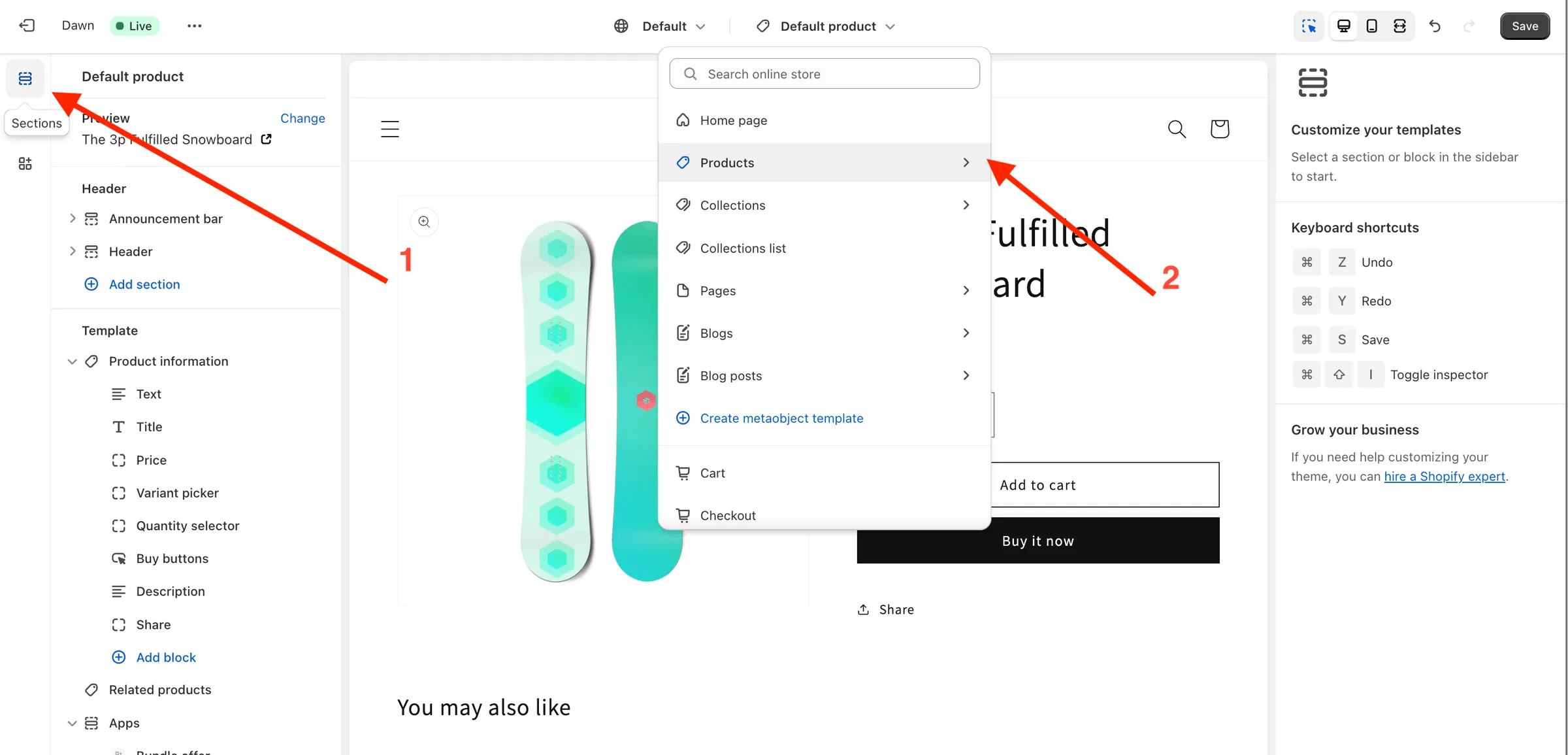
2) click on Sections in the left menu → choose a page type you want to add an app’s widget to in the selector at the top of the page:
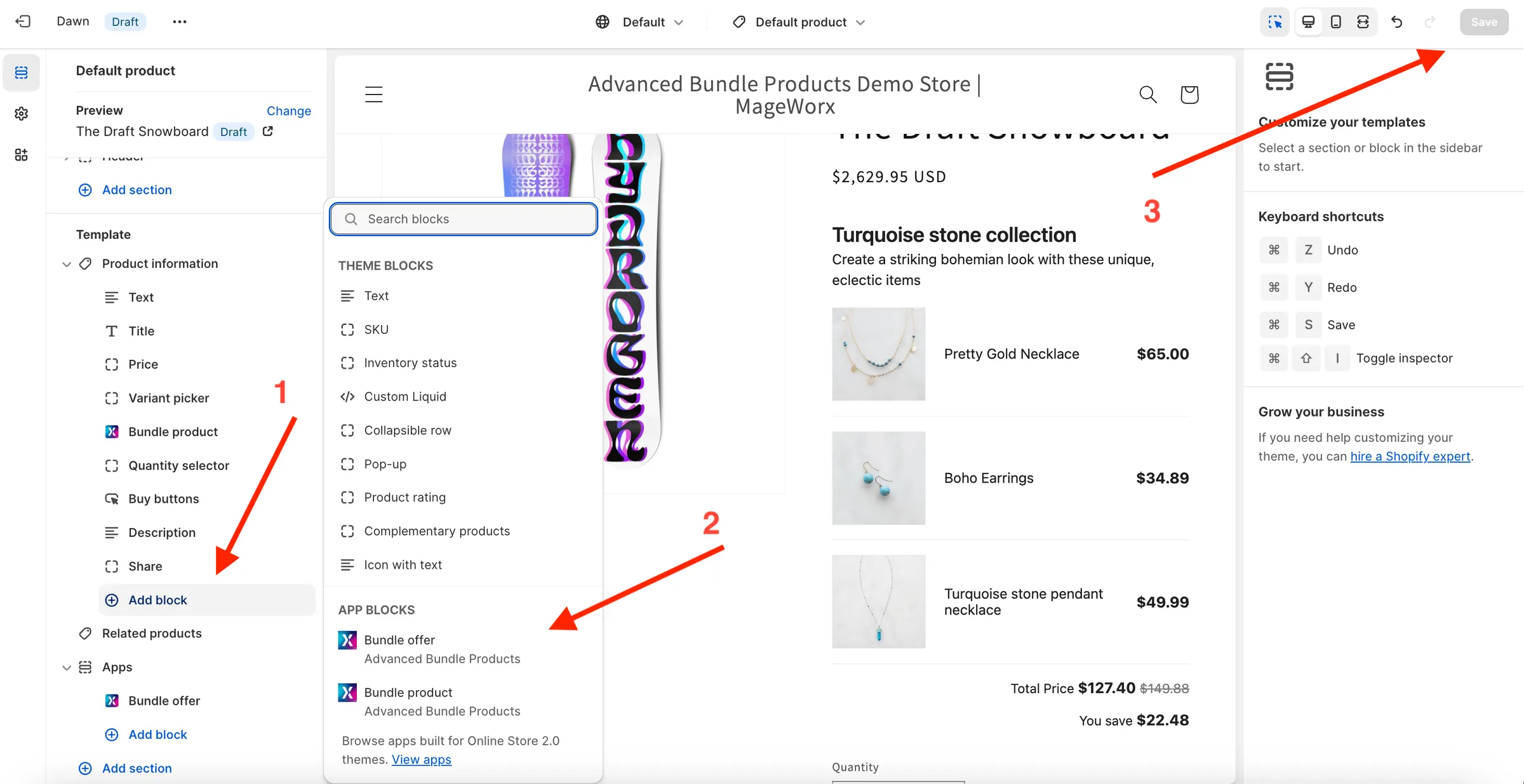
3) click on Add block link in the section you want to add an app’s block to → choose a block of our Product Bundles by Mageworx app;
4) move the block using the drag&drop to the desired placement;
5) click Save.
Themes 1.0
Section titled “Themes 1.0”For themes 1.0 or the themes that do not support adding apps’ widgets to the necessary blocks, in order to add an app’s blocks to a storefront, you can add the following code snippet manually in the theme customizer:
Bundle offer widget (FBT)
<!-- BEGIN: Advanced Bundle Products – Bundle Offer --><script>if(window.mwMarketingOffersHelper&&mwMarketingOffersHelper.bundleOfferWidgetScript){let e=document.createElement("script");e.async="async",e.type="module",e.src=mwMarketingOffersHelper.bundleOfferWidgetScript,document.head.append(e)}</script><mw-bundle-offer></mw-bundle-offer><!-- END: Advanced Bundle Products – Bundle Offer -->Grouped product widget
<!-- BEGIN: Advanced Bundle Products – Bundle Product --><script>if(window.mwMarketingOffersHelper&&mwMarketingOffersHelper.bundleWidgetScript){let e=document.createElement("script");e.async="async",e.type="module",e.src=mwMarketingOffersHelper.bundleWidgetScript,document.head.append(e)}</script><mw-bundle-product></mw-bundle-product><!-- END: Advanced Bundle Products – Bundle Product -->Buy X Get Y (BOGO) widget
<!-- BEGIN: Advanced Bundle Products – BOGO Offer --><script>if(window.mwMarketingOffersHelper&&mwMarketingOffersHelper.bogoOfferWidgetScript){let e=document.createElement("script");e.async="async",e.type="module",e.src=mwMarketingOffersHelper.bogoOfferWidgetScript,document.head.append(e)}</script><mw-bogo-offer></mw-bogo-offer><!-- END: Advanced Bundle Products – BOGO Offer -->Grouped product promo widget
<!-- BEGIN: Advanced Bundle Products – Products in bundle --><script>if(window.mwMarketingOffersHelper&&mwMarketingOffersHelper.productsInBundleScript){let e=document.createElement("script");e.async="async",e.type="module",e.src=mwMarketingOffersHelper.productsInBundleScript,document.head.append(e)}</script><mw-products-in-bundle></mw-products-in-bundle><!-- END: Advanced Bundle Products – Products in bundle -->Cross-sell embedded widget
<!-- BEGIN: Advanced Bundle Products – Cross-sell Offers --><script>if(window.mwMarketingOffersHelper&&mwMarketingOffersHelper.crosssellOffersWidgetScript){let e=document.createElement("script");e.async="async",e.type="module",e.src=mwMarketingOffersHelper.crosssellOffersWidgetScript,document.head.append(e)}</script><mw-crossell-block></mw-crossell-block><!-- END: Advanced Bundle Products – Cross-sell Offers -->Product add-ons widget
<!-- BEGIN: Advanced Bundle Products – Product Addons --><script>if(window.mwMarketingOffersHelper&&mwMarketingOffersHelper.productAddonsScript){let e=document.createElement("script");e.async="async",e.type="module",e.src=mwMarketingOffersHelper.productAddonsScript,document.head.append(e)}</script><mw-product-addons></mw-product-addons><!-- END: Advanced Bundle Products – Product Addons -->Volume bundle widget
<!-- BEGIN: Advanced Bundle Products – Volume Bundle Offer --><script>if(window.mwMarketingOffersHelper&&mwMarketingOffersHelper.volumeBundleOfferWidgetsScript){let e=document.createElement("script");e.async="async",e.type="module",e.src=mwMarketingOffersHelper.volumeBundleOfferWidgetsScript,document.head.append(e)}</script><mw-volume-bundle></mw-volume-bundle><!-- END: Advanced Bundle Products – Volume Bundle Offer -->Tier pricing widget
<!-- BEGIN: Advanced Bundle Products – Tier Prices Offer --><script>if(window.mwMarketingOffersHelper&&mwMarketingOffersHelper.tierPricesOfferWidgetScript){let e=document.createElement("script");e.async="async",e.type="module",e.src=mwMarketingOffersHelper.tierPricesOfferWidgetScript,document.head.append(e)}</script><mw-tier-prices data-settings="{"show_compare_at_price":true,"show_discount":true}"></mw-tier-prices><!-- END: Advanced Bundle Products – Tier Prices Offer -->Mix & Match (Compact) widget
<!-- BEGIN: Advanced Bundle Products – Mix & Match (Compact) Offer --><script>if(window.mwMarketingOffersHelper&&mwMarketingOffersHelper.bundleOfferWidgetScript){let e=document.createElement("script");e.async="async",e.type="module",e.src=mwMarketingOffersHelper.bundleOfferWidgetScript,document.head.append(e)}</script><mw-pdp-offer></mw-pdp-offer><!-- END: Advanced Bundle Products – Mix & Match (Compact) Offer -->Mix & Match (Expanded) widget
<!-- BEGIN: Advanced Bundle Products – Build Your Offer --><script>if(window.mwBuildOffer&&mwBuildOffer.script){let e=document.createElement("script");e.async="async",e.type="module",e.src=mwBuildOffer.script,document.head.append(e)}</script><mw-build-offer></mw-build-offer><!-- END: Advanced Bundle Products – Build Your Offer -->