
How to group products for a 3PL workflow (Mix&Match bundles)
When a bundle is added to the cart, the app adds special line item properties to the products that belong to that bundle. These properties can be used by a 3PL, Order Printer template, or custom fulfillment workflow to understand which products belong together.
This is especially useful when a customer adds the same bundle with different products is added to the cart more than once.
This grouping logic works in both supported cart and checkout modes: **Grouped bundle in cart (**powered by Shopify Cart Transform) and Separate items + automatic discount, (powered by Shopify Discount function).
In both modes, the app adds the _mw_marketing_offers_offer_id property to bundle products, so products can be grouped by the same logic in the order data.
Key line item property
Section titled “Key line item property”Each product that belongs to a bundle includes the following property:
_mw_marketing_offers_offer_id
The value looks like this:
53478/27457
This value contains two parts:
bundle_offer_id/session_id
For example:
53478 = bundle/offer ID
27457 = session ID for this specific bundle instance
What each part means
Section titled “What each part means”The number before the slash identifies the bundle itself.
The number after the slash identifies the specific bundle instance that was added to the cart.
This distinction is important for 3PL workflows.
Case 1: The same bundle is added multiple times
Section titled “Case 1: The same bundle is added multiple times”If a customer adds the same bundle more than once, the bundle/offer ID before the slash will stay the same, but the session ID after the slash will be different for each bundle instance.
For example:
Organic Lemon Poppyseed
_mw_marketing_offers_offer_id: 53478/27457
Organic Oatmeal Date
_mw_marketing_offers_offer_id: 53478/27457
Nuts & Caramel
_mw_marketing_offers_offer_id: 53478/27354
Organic Peanut Butter & Jelly
_mw_marketing_offers_offer_id: 53478/27354
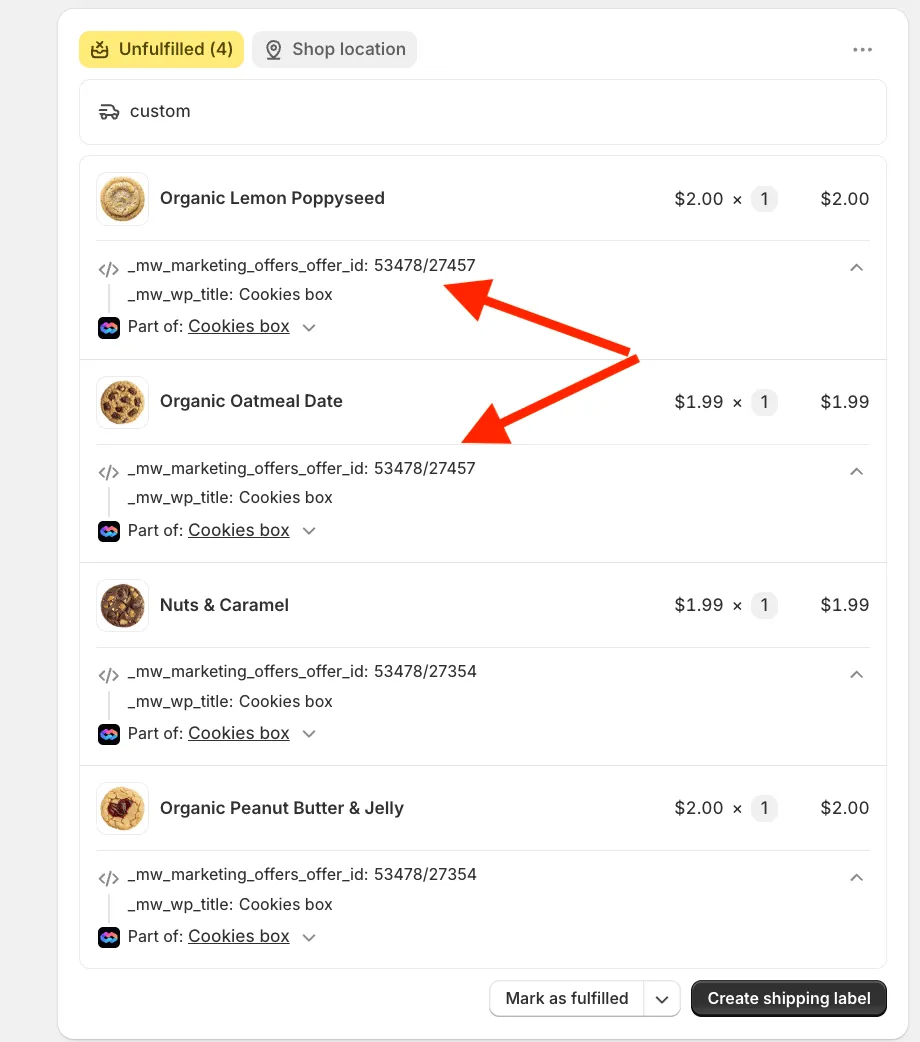
In this example, all products are from the same bundle, because the bundle/offer ID is the same:53478
But they belong to two different bundle instances:
53478/27457 = first bundle instance / first box
53478/27354 = second bundle instance / second box
So the 3PL can group products by the full _mw_marketing_offers_offer_id value to understand which products belong to the same box or bundle instance.
Case 2: Different bundles are added to the same order
Section titled “Case 2: Different bundles are added to the same order”If a customer adds different bundles to the same order, the bundle/offer ID before the slash will be different.
For example:
Product A
_mw_marketing_offers_offer_id: 53478/27457
Product B
_mw_marketing_offers_offer_id: 53478/27457
Product C
_mw_marketing_offers_offer_id: 61290/88112
Product D
_mw_marketing_offers_offer_id: 61290/88112
In this example:
53478 = first bundle
61290 = second bundle
Each full value still identifies a specific bundle instance:
53478/27457 = one specific instance of the first bundle
61290/88112 = one specific instance of the second bundle
Recommended approach for 3PL workflows
Section titled “Recommended approach for 3PL workflows”For most 3PL workflows, we recommend grouping bundle products by the full value of:
_mw_marketing_offers_offer_id
This allows your system to identify which products belong to the same specific bundle instance, when the same bundle was added multiple times, and when different bundles were added to the same order.
If needed, your system can also split the value by /: bundle_offer_id/session_id
Use the value before the slash to identify the bundle type.
Use the value after the slash to identify the specific bundle instance in the order.
Other bundle properties
Section titled “Other bundle properties”Depending on your app configuration, bundle products may also include additional properties such as:
_mw_wp_title
Part of
For example:
_mw_wp_title: Cookies box
Part of: Cookies box
These properties can help make the order easier to read in the Shopify admin, but for programmatic grouping, _mw_marketing_offers_offer_id is the most important value.
Need a different property format?
Section titled “Need a different property format?”If your 3PL requires a different structure - please contact our support team.
We are actively improving our bundle properties to support more advanced fulfillment and 3PL workflows.