Mix and Match Bundles on Shopify: How to Let Customers Build Their Own Bundle
 Vitali10 min read
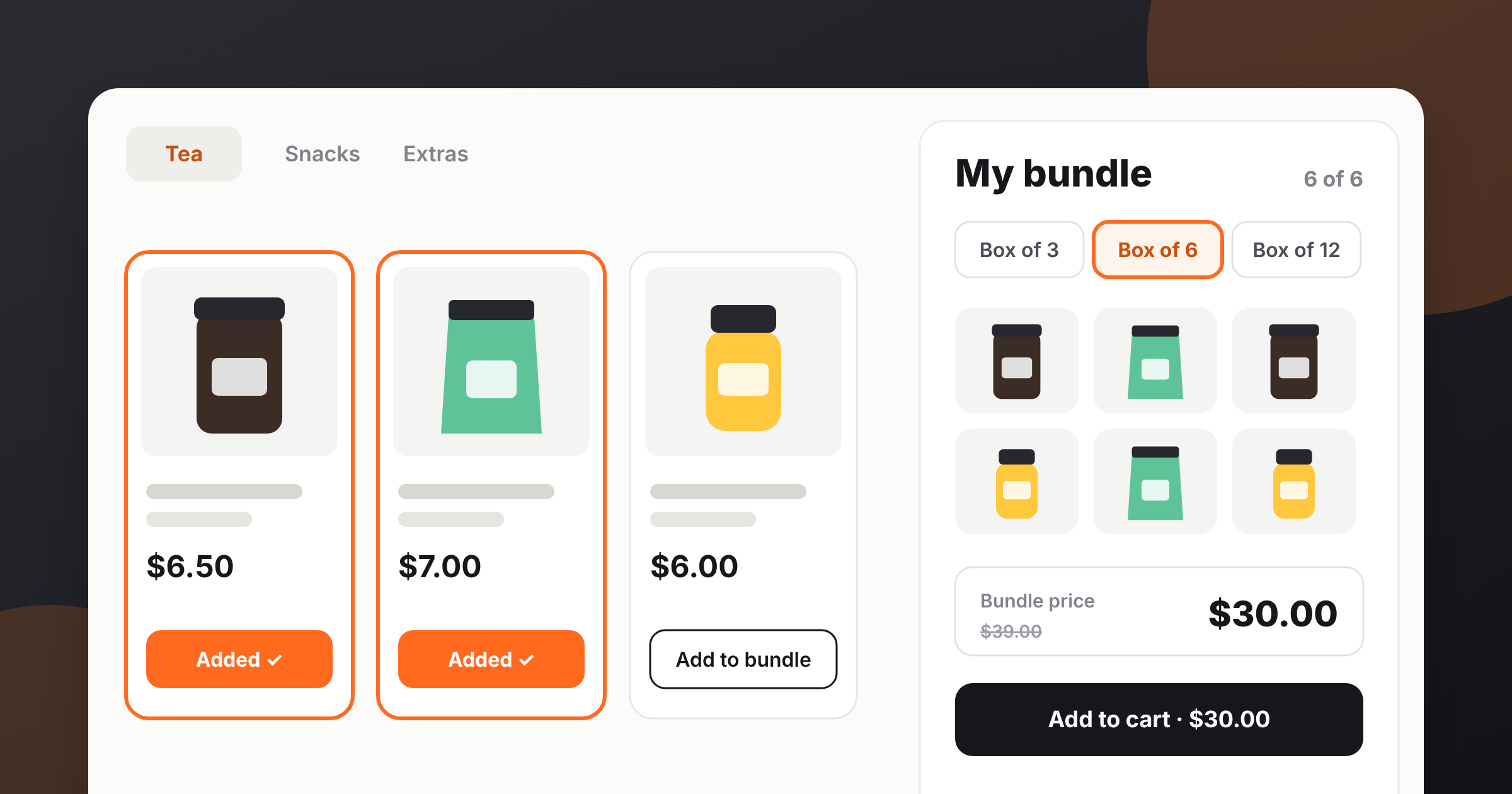
A mix and match bundle on Shopify lets customers build their own bundle from products you choose and get a bundle price for it. Shopify's built-in bundles only cover fixed sets and multipacks, so you need an app for this. In MW Bundle Builder you pick the products, decide how many make a bundle, set the price or discount, and place the builder on your store.
“Any three for $25” sounds simple until you try to set it up in Shopify and find there’s no product to put it on: every customer’s bundle is a different combination. This guide covers how mix and match works, the three decisions to make before you build one, and the setup.
What a mix and match bundle is
A mix and match bundle is a bundle where the customer chooses the contents from a set you define, and the price follows your rules, not the sum of the items. It’s also called build your own bundle (BYOB), or pick and mix.
It sits next to a few other bundle types, and it helps to know which one you actually need:
| Bundle type | Who picks the products | Best for |
|---|---|---|
| Fixed bundle | You | A set that always ships the same, like a gift set or a starter kit |
| Multipack / quantity breaks | You (one product, more units) | Buying more of the same thing for less |
| Mix and match (build your own bundle) | The customer, from your list | Interchangeable products: flavours, scents, shades, sizes |
| Build a box | The customer, into a box of a set size | Gift boxes and sampler boxes with a clear “box of N” |
Build a box is a kind of mix and match with fixed box sizes, and both are set up the same way in Bundle Builder. If what you need is a set that never changes, a product kit is simpler.
When mix and match works best
Mix and match works best when your products are interchangeable and people have opinions about which ones they get. If everyone would build the same bundle anyway, sell a fixed one.
Flavours, scents and shades
Snacks, tea, coffee, candles, cosmetics. The product is the same format and the choice is the fun part, so the bundle grows the order instead of discounting what people would have bought anyway.
Trying something new
A bundle lowers the risk of a new flavour or a new line. People add the one they wouldn't have bought on its own.
Gifting
A customer who builds a gift box for someone else picks carefully and rarely stops at the minimum.
"Any N for $X" promotions
The classic multi-buy deal across a range, without creating a bundle product for every combination.
Complete-the-set outfits and routines
One item from each category: a top, a bottom and an accessory, or a cleanser, a serum and a cream.
Plan your mix and match bundle before you build it
Three decisions shape every bundle of this kind: how customers choose, how big the bundle is, and how you price it. Make them on paper first and the setup takes minutes.
How customers choose
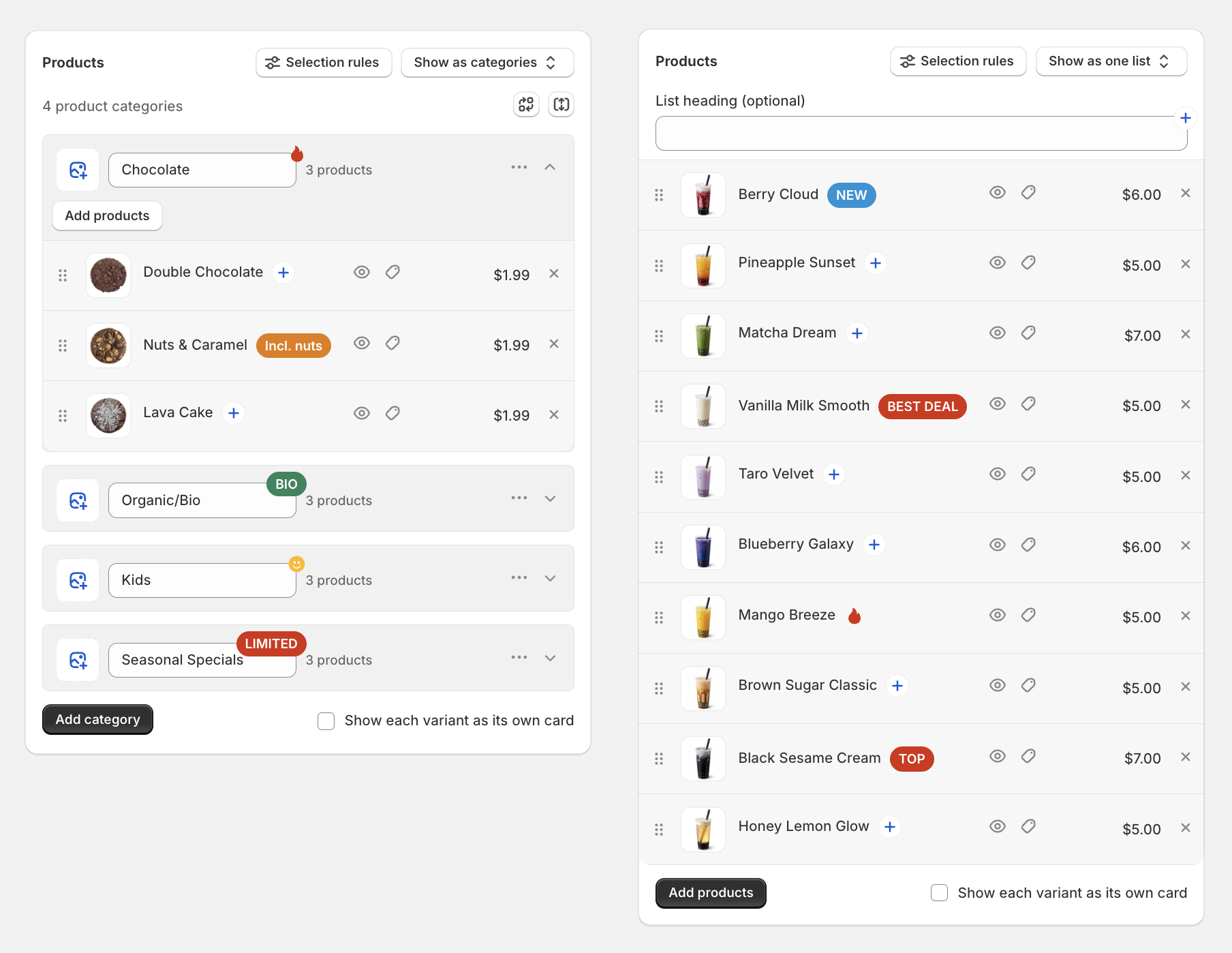
Either all eligible products sit in one list, or you group them into categories. Categories are worth it once you have more than a screen of products, or when the bundle needs a structure, like one item from each group.
Each category can have its own minimum and maximum. That’s how you build “one from each” bundles, or cap a category so the bundle doesn’t fill up with your most expensive line. For large catalogues, turn on product search so customers can find a product by name inside the builder.
How big the bundle is
| Bundle size | What it means | Good for |
|---|---|---|
| Any number | No limit on the total | Open “the more you add, the more you save” deals |
| Min and max | A minimum, and optionally a maximum | “Pick at least three” bundles |
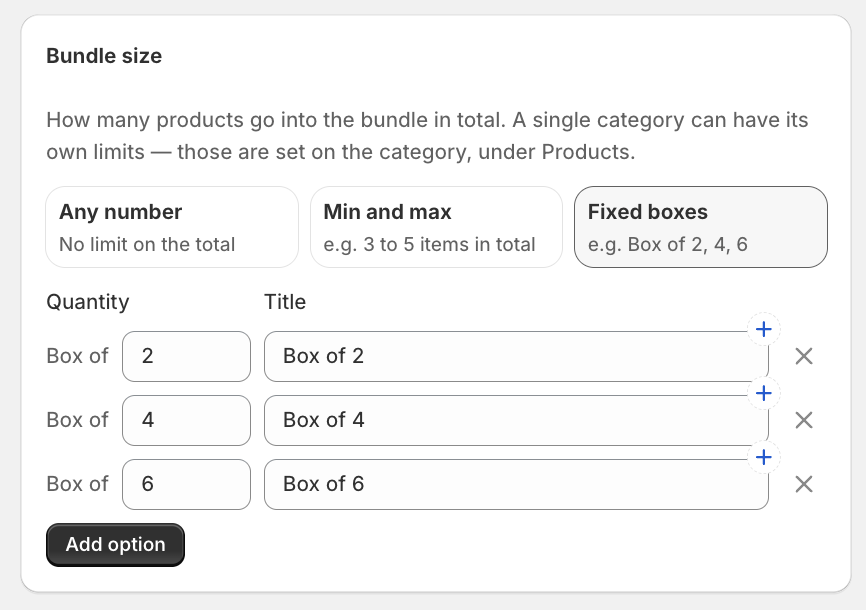
| Fixed boxes | One or more box sizes the customer picks from | Gift and sampler boxes, “box of 4, 6 or 12” |
With fixed boxes, each box can have its own price and its own gift. There’s also an Auto-upgrade box size setting: when a customer adds more than the current box holds, the builder moves them to the next box size instead of stopping them.
How you price it
| Pricing | What the customer pays | Example |
|---|---|---|
| Fixed price | One price for the bundle, whatever they pick | Any 3 for $25 |
| Discount | A percentage or an amount off the items | 15% off the bundle |
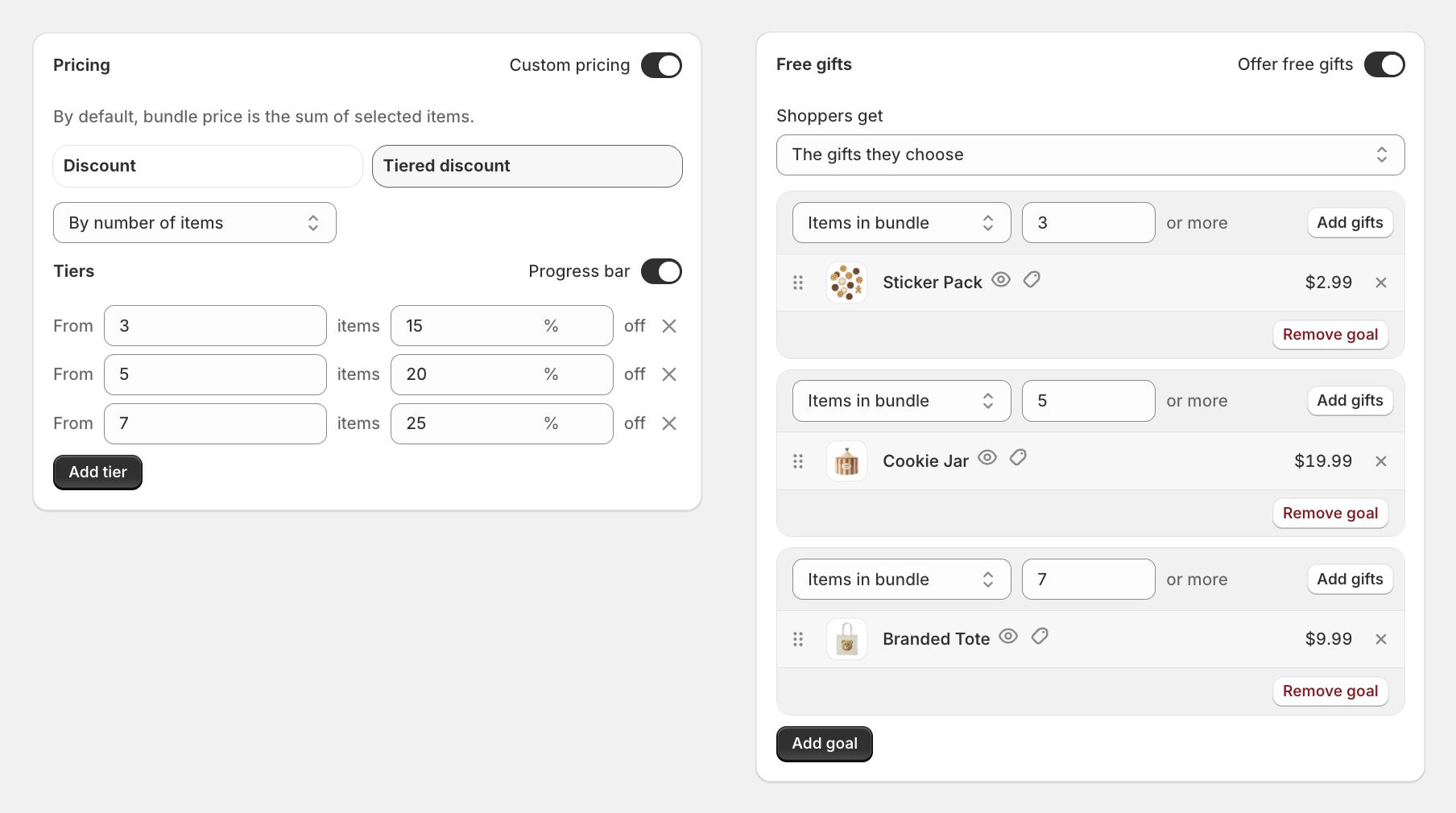
| Tiered discount | A bigger discount as the bundle grows, by item count or order value | 3 items 10% off, 6 items 20% off |
| Price per box | A price set on each box size | Box of 6 for $30, box of 12 for $54 |
The examples are only examples. Your own prices and thresholds will differ. The choices also depend on the bundle size: tiered discounts work with Any number and Min and max, and with Fixed boxes you set a discount or a fixed price for each box.
On top of any of these you can add free gifts when the bundle reaches a goal, like a number of items. Gifts can be added automatically, or the customer picks the ones they want from a list you choose. A gift people can see and work towards gives them a reason to add one more item.
How to create a mix and match bundle in Shopify
You set it up as a Mix & Match offer in MW Bundle Builder, then add its widget to the bundle’s product page in the theme editor. The steps below follow the offer editor from top to bottom.
Create the offer and choose a layout
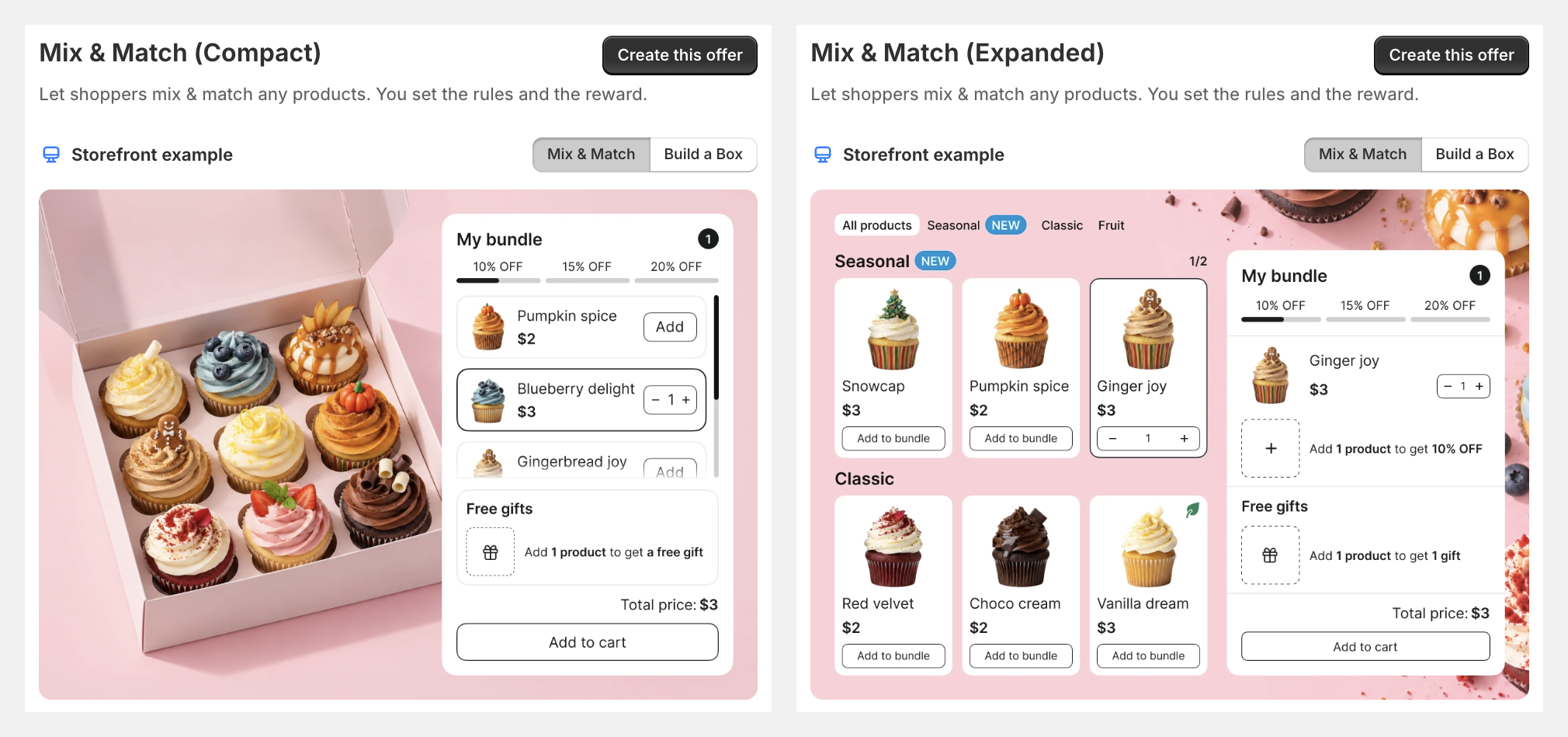
In the app, create a new offer and choose Mix & Match (Expanded) or Mix & Match (Compact). Expanded is a full-page builder with a summary panel. Compact is a smaller block that fits into your product page. The layout is chosen once, when you create the offer.
Add products in categories or a single list
In the Products card, choose Show as categories or Show as one list. Add products, specific variants or a whole collection to each category, and set a category minimum or maximum if the bundle needs one.
Set the bundle size
Under Bundle size, choose Any number, Min and max or Fixed boxes. For fixed boxes, use Add option for each box size and give it the title shoppers will see.
Set the price and free gifts
By default the bundle costs the sum of its items. Turn on Custom pricing and choose Discount, Fixed price or Tiered discount, then fill in the amounts. The Progress bar shows customers how far they are from the next tier.
To reward bigger bundles, turn on Offer free gifts, choose what shoppers get (All gifts, added automatically or The gifts they choose), and add a goal for each reward, like 5 items in the bundle.
Preselect, lock or reset products (optional)
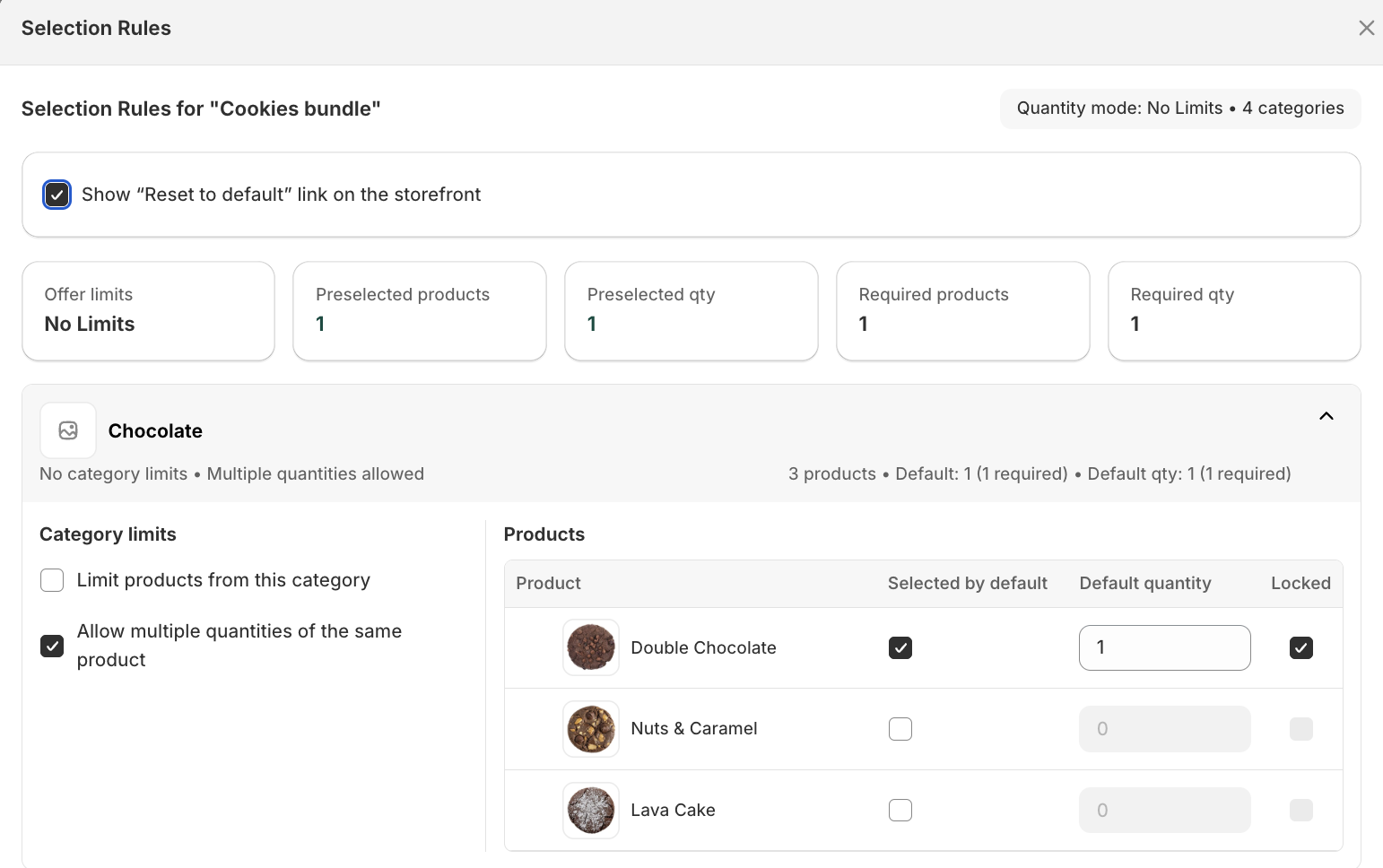
Open Selection rules to start customers with a ready-made bundle instead of an empty one. Tick Selected by default for the products you suggest and set their Default quantity. For products with variants, choose First in stock or a Specific variant. Tick Locked when a product must stay in every bundle, like the base product of a kit.
Show "Reset to default" link on the storefront lets customers go back to your suggested bundle after they change it.
Choose how the bundle appears in the cart
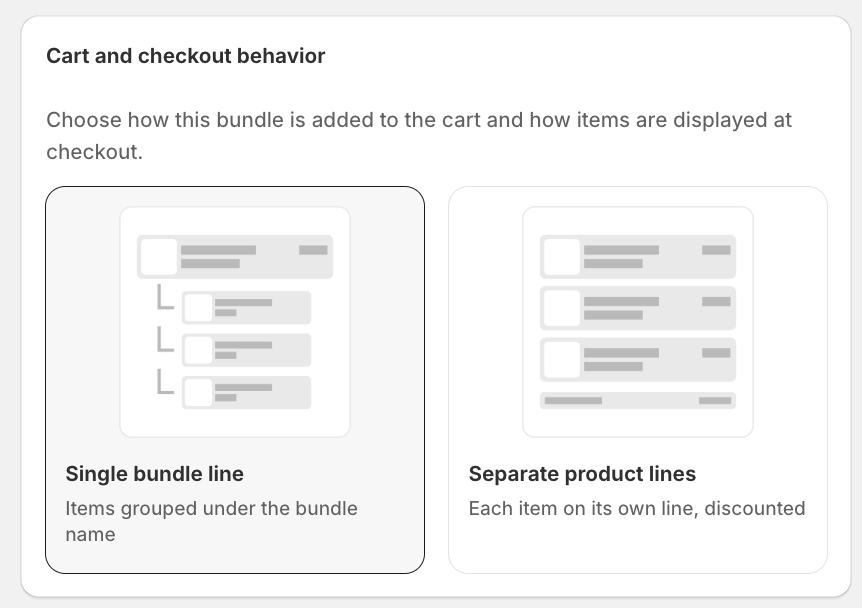
Under Cart and checkout behavior, choose Single bundle line (items grouped under the bundle name) or Separate product lines (each item on its own line, discounted). Subscription bundles always use separate product lines.
Sell it as a subscription (optional)
Under Purchase options, choose One-time only, One-time and subscription or Subscription only. The full setup is in the build-a-box subscription guide.
Place the builder on your store and test it
Follow the Mix & Match setup checklist in the offer: add the Mix & Match widget to the bundle's product page in the theme editor, then build a bundle on the storefront and go through to checkout once yourself.
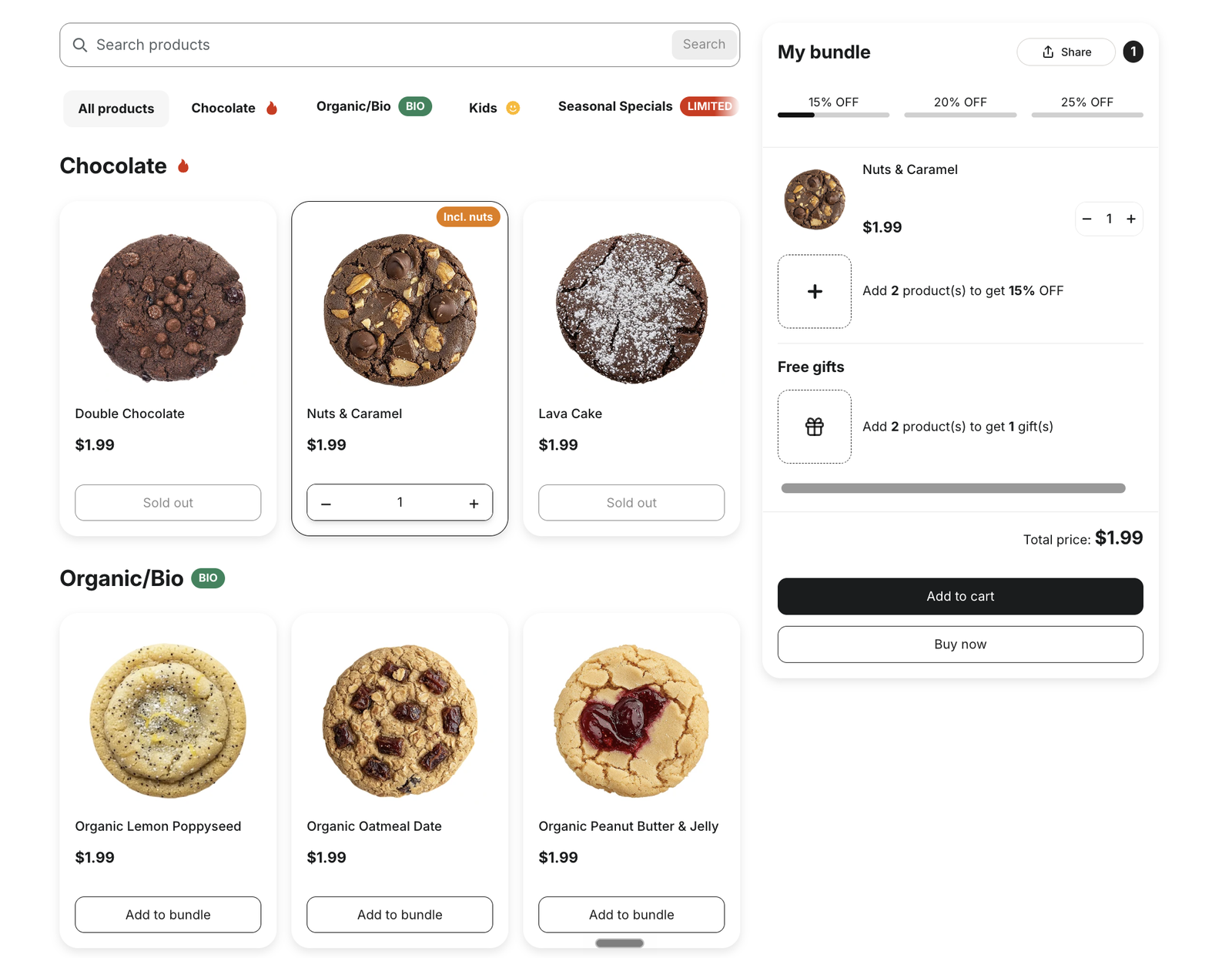
This is what customers see. Expanded shows categories, product search and the bundle summary with tiers and gifts:
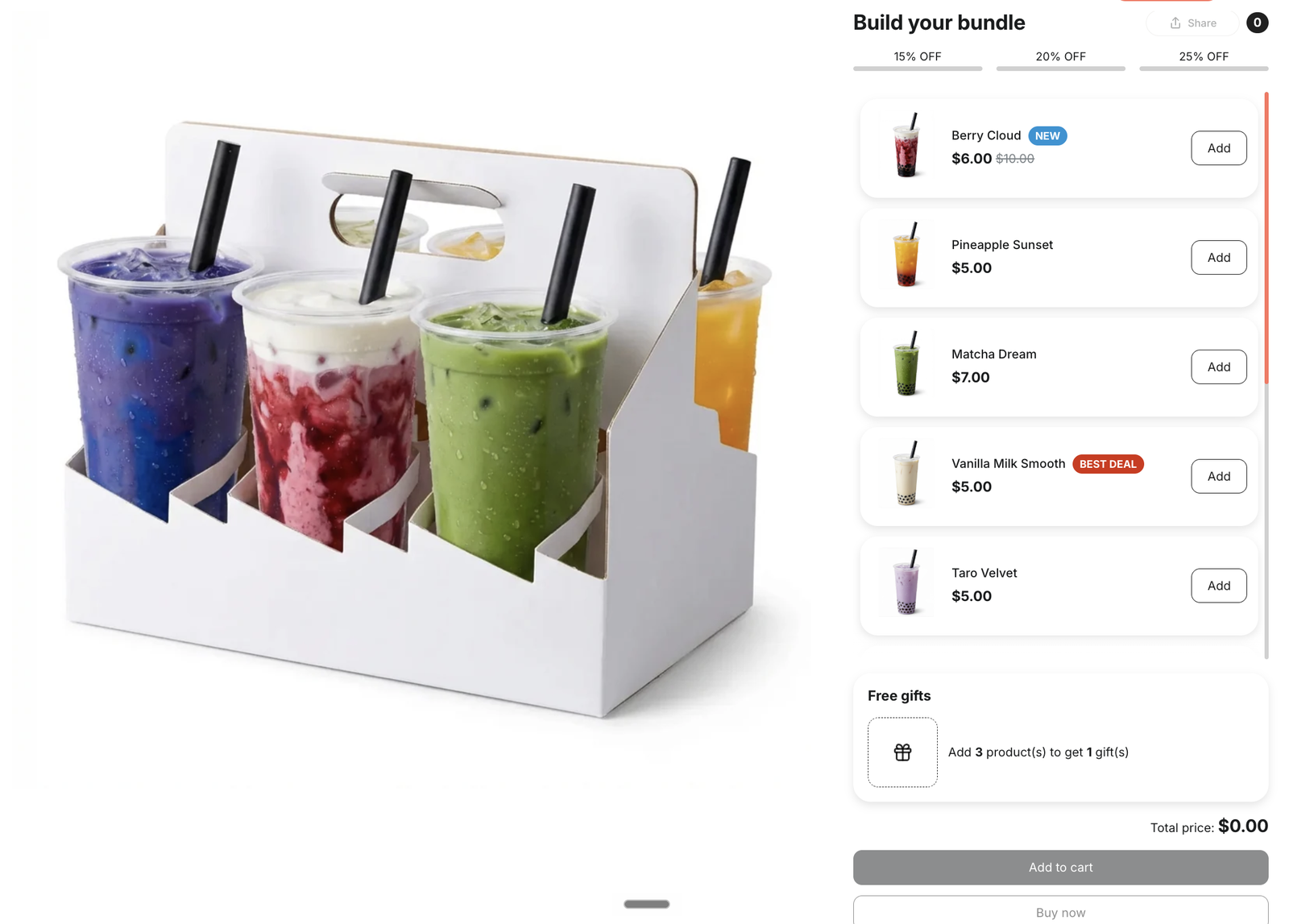
Compact sits next to the product photo on the bundle's page:
Turn on Bundle sharing in the app settings and customers get a button that copies a link to the bundle they built. It's handy for gift boxes, and for your own social posts with a ready-made bundle.
The Mix & Match guide in our knowledge base covers every setting in detail, and selection limits and default products goes deeper into step 5.
Inventory, variants and discount codes
These three come up in almost every conversation about this kind of bundle, so here are the short answers.
Inventory. Stock is tracked on the products inside the bundle, in Shopify’s own inventory. Every product a customer picks is deducted from that product’s stock, the same way Shopify handles any bundle’s components. The bundle itself has no stock of its own, so there are no dummy products and nothing to sync.
Variants. Customers pick the variant on each product card, and you decide which variants are allowed. For flavours, scents or colours you can show every variant as its own card.
Discount codes. Discount codes still work. What happens depends on how the bundle appears in the cart:
- Separate product lines: you choose in the app settings whether the bundle discount combines with product, order and shipping discounts. All three are allowed by default.
- Single bundle line: the bundle price is already in the line’s price, so a store-wide code applies on top of it. If you don’t want that, exclude the bundle product from the code’s collections. Our guide to preventing discount stacking shows how.
Can you make a mix and match bundle without an app
You can get part of the way without an app, and for a very simple deal that may be enough. Shopify’s built-in bundles cover fixed sets and multipacks, where you decide the contents. For a bundle the customer builds, there are two common workarounds:
- A collection page with an automatic discount. Put the eligible products in a collection and create a “buy 3, get 10% off” discount. It works for a plain multi-buy. There are no box sizes, no rules per category and no bundle on a page, and customers often don’t notice the deal at all.
- A bundle product with variants. One product whose variants are the combinations. It falls apart quickly: three flavours in a box of three is already ten combinations, and you track the stock of each one by hand.
| Shopify without an app | MW Bundle Builder | |
|---|---|---|
| Customer builds the bundle on one page | No | Yes |
| Box sizes and category rules | No | Yes |
| Fixed bundle price across different prices | Variant workaround only | Yes |
| Stock tracked per product | Collection discount only | Yes |
| Free gifts at a tier | No | Yes |
| Sell the bundle as a subscription | No | Yes |
If your deal is “buy any 3 from this collection, get 10% off” and nothing else, try the collection discount first. When you need the builder, the box or the fixed price, that’s what the app is for.
Tips for a bundle people finish
A bundle like this only pays off when customers complete it. Four things help.
Start with a full bundle, not an empty one
Preselect your best sellers so the bundle is ready to buy on arrival. Customers swap a product or two instead of building from zero.
Keep the choice small
Two or three box sizes and a handful of categories. Every extra option is another reason to leave and come back later.
Show the saving and the next reward
The progress bar and "add one more to unlock" messages do most of the selling. Put the gift at a tier people can reach.
Read the numbers after a week
The offer's Mix & Match analytics show which products get picked or removed, where customers drop off, and what they search for in the builder. A product nobody picks is taking space from one that sells.
Before you launch, it’s worth a look at the usual bundling mistakes, and at volume discount formulas if you’re still deciding how deep the tiers should go.
Getting started
A mix and match bundle comes down to three decisions and one offer: how customers choose, how big the bundle is, and what it costs. Start with one bundle on your best range, watch it for a week, and adjust from what customers actually pick.
Let customers build their own bundle
MW Bundle Builder adds mix and match bundles, build a box and tiered discounts with free gifts to your Shopify store, no code needed.
Try it free on Shopify Free trial availableQuestions merchants ask me
Can Shopify do mix and match bundles without an app?
Not really. Shopify's built-in bundles cover fixed sets and multipacks, where you decide what goes in. For a bundle the customer builds, you need an app, or a workaround with a collection page and an automatic discount that has no box sizes and no rules per category.
Does stock come off each product in a mix and match bundle?
Yes. Every product the customer picks is deducted from its own inventory in Shopify. The bundle itself has no stock of its own, so you never sync numbers between a bundle and its contents.
Can customers pick variants, like size or flavour, inside the bundle?
Yes. Customers choose the variant on each product card, and you can limit which variants are allowed. You can also show every variant as its own card, which works well for flavours and scents.
Can I charge one fixed price for products that cost different amounts?
Yes. Choose Fixed price in the offer's pricing and set the bundle price. The customer pays that price whatever combination they pick, so an "any 3 for $25" deal works even when single items are priced differently.
Can I make customers take one product from each category?
Yes. Split the products into categories and give each category its own minimum and maximum. A minimum of one in every category gives you a "one from each" bundle, like a top, a bottom and an accessory.
Can part of a mix and match bundle be fixed?
Yes. Preselect a product and lock it, and customers must keep it in the bundle while they choose the rest. That's how you build "the starter kit plus any three refills" without two separate offers.
Can a mix and match bundle be a subscription?
Yes. Set the purchase options to one-time only, one-time and subscription, or subscription only. Subscription bundles always show their products as separate lines in the cart, because Shopify doesn't support grouped bundles on subscriptions.
Do discount codes still work with mix and match bundles?
Yes. With separate product lines you choose in the app settings whether the bundle discount combines with other discounts. With a single bundle line, a store-wide code applies on top of the bundle price unless you exclude the bundle product from the code's collections.
Vitali leads Mageworx with sharp ideas and eCommerce expertise. Always innovating, he finds smart solutions—except when he's busy pretending not to work.