
How to Create a Subscription Box on Shopify (Build-a-Box)
 Vitali7 min read
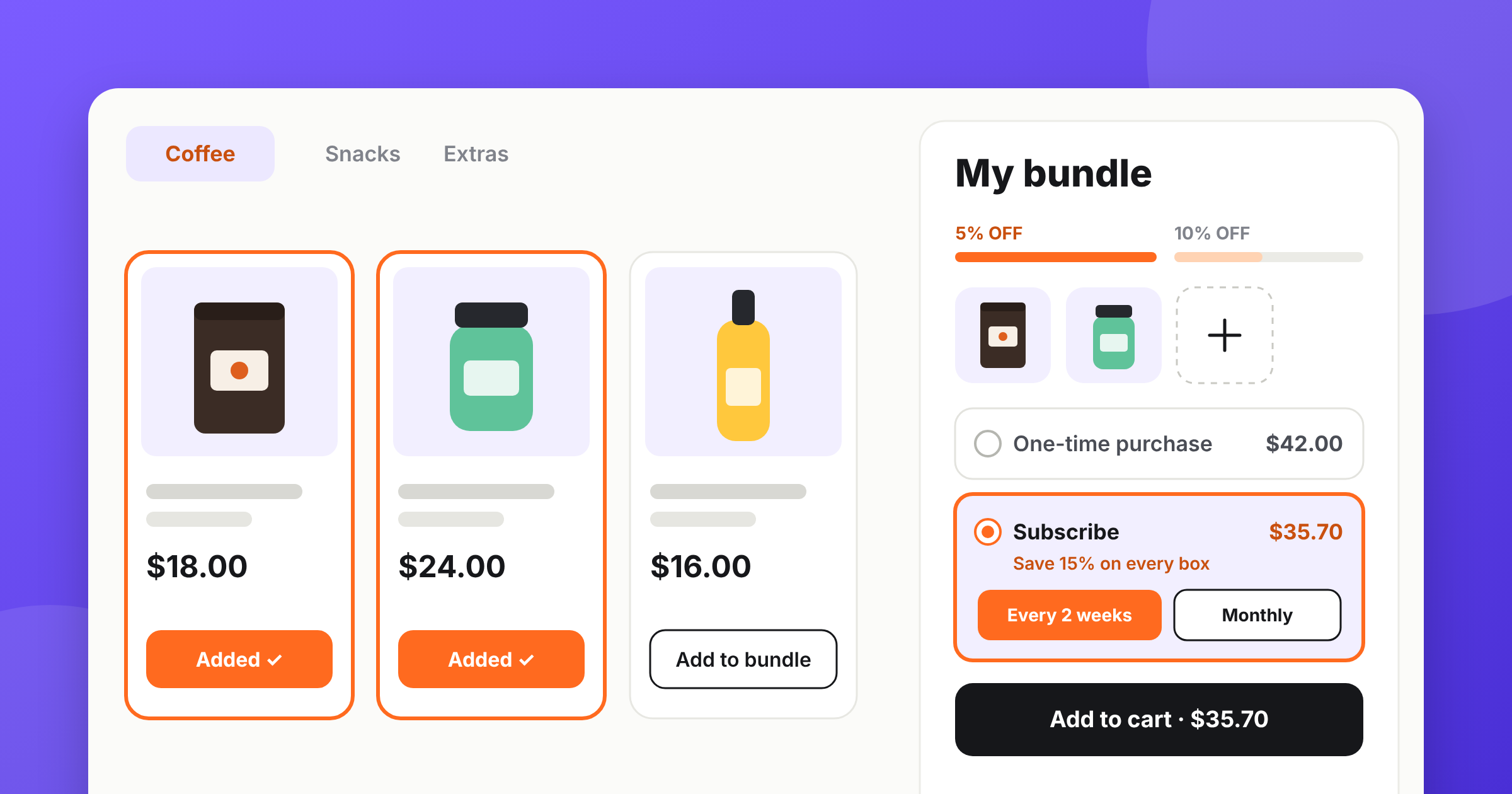
A build-a-box subscription turns a mix and match bundle into a subscription box that comes back every month: the shopper builds the box, picks how often it should arrive, and the same box ships and bills itself until they stop it. Shopify can handle the recurring charge through a subscription app, but it has no box builder. MW Bundle Builder does both — you build the box, turn subscriptions on, and shoppers can either buy it once or subscribe and save.
We shipped subscription boxes in early November, on purpose before Black Friday. BFCM brings you more new customers than any other week of the year, and most of them buy once and you never hear from them again. A box someone built themselves is the easiest thing to turn into a repeat order.
What a build-a-box subscription box is
A build-a-box subscription is one recurring order whose contents the customer chose. They build a box from your catalog, pick how often they want it, and Shopify charges that same box on that schedule until they pause or cancel.
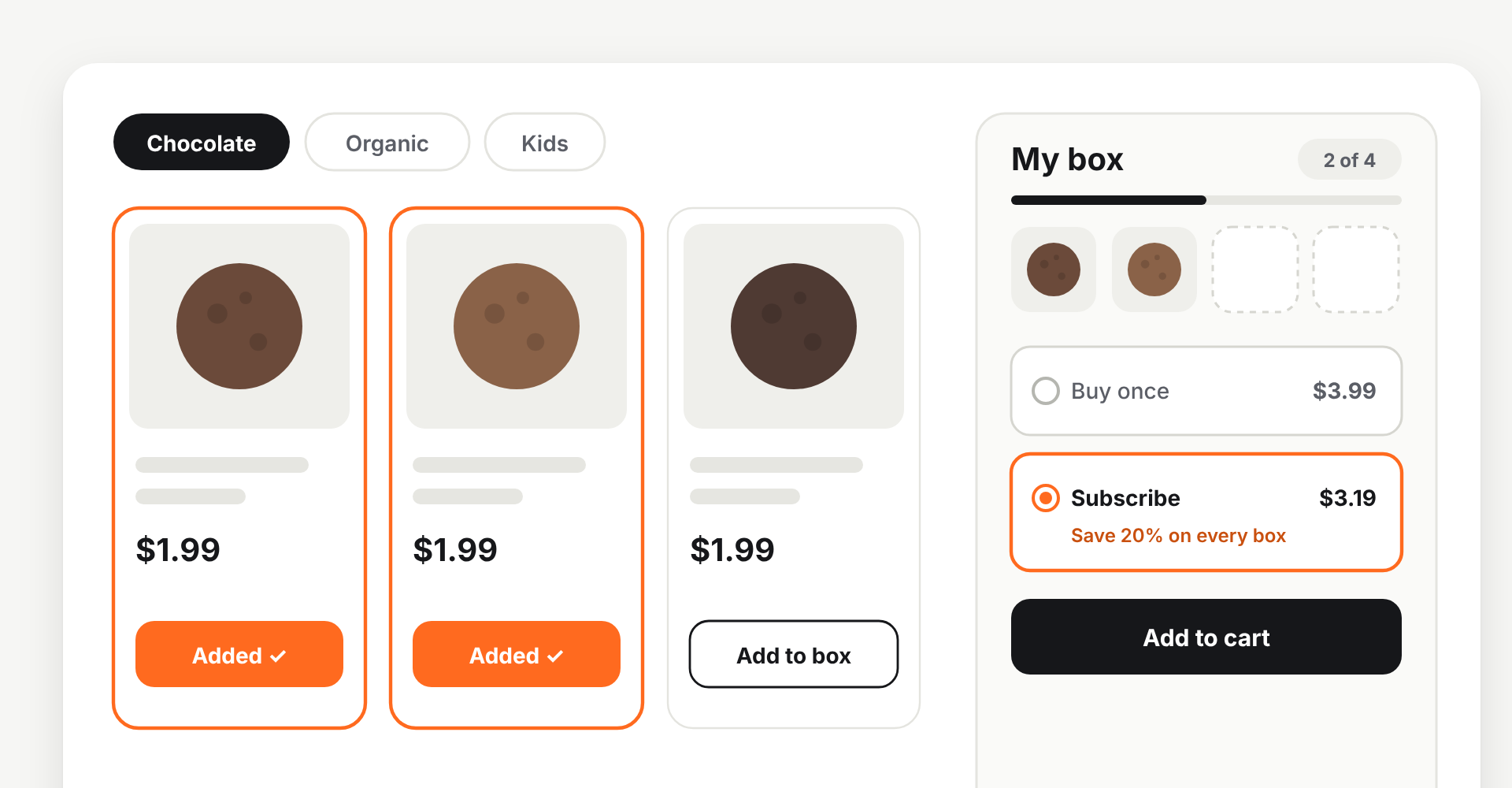
From the shopper’s side it’s one extra choice: buy the box once, or get it on repeat for less.
Which kind of box are you selling
Shopify groups subscription boxes into four models, and it’s worth knowing which one you’re in before you set anything up:
- Curated — you choose what goes in and rotate it each month. Discovery is the product.
- Replenishment — the same essentials come back on schedule. Supplements, pet food, coffee, razors.
- Build your own — the customer picks the contents. Harder on your inventory, easier on retention.
- Hybrid — people can subscribe or buy one-off from the same catalog.
This article is about the third one, and in practice most stores end up in the fourth: a build-a-box page where people can also just buy once. Curated boxes are the biggest slice of the market — McKinsey puts them at 55% of subscriptions — but they’re also the model where you carry all the guesswork about what people want.
If you’d rather ship a fixed, pre-set box than let people choose, that’s a different setup — product kits covers it.
Why put a bundle on subscription
A bundle already raises your average order value — that’s the point of a build a box page. Subscription is what makes that bigger order come back on its own.
Predictable recurring revenue
A good share of next month is already booked, so you buy stock and plan packing from a number, not a hunch.
Higher lifetime value
You pay to win a customer once. Shopify puts subscriber lifetime value at two to three times a one-time buyer's — and a subscriber takes the whole box again.
Loyalty that isn't just a discount
A box people built themselves is harder to give up. Make skipping easy and they skip instead of cancelling.
Room to grow the order
A bigger box, a more frequent delivery, a new product in the builder — it all reaches people who already pay you monthly.
What it looks like in practice
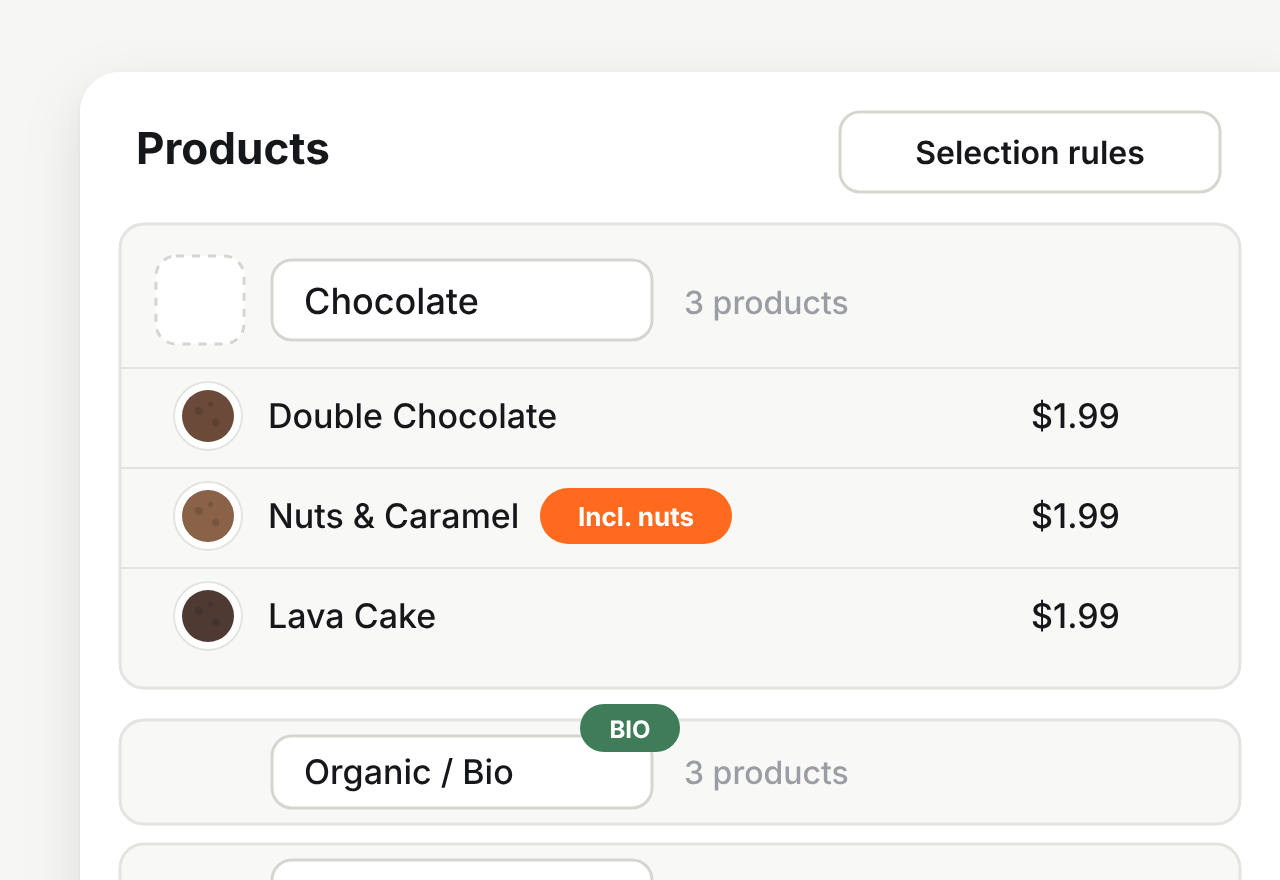
You build the box once
Pick the products that can go in it, group them into categories, decide how many items make a box. The same offer serves one-time buyers and subscribers — you don't maintain two pages.
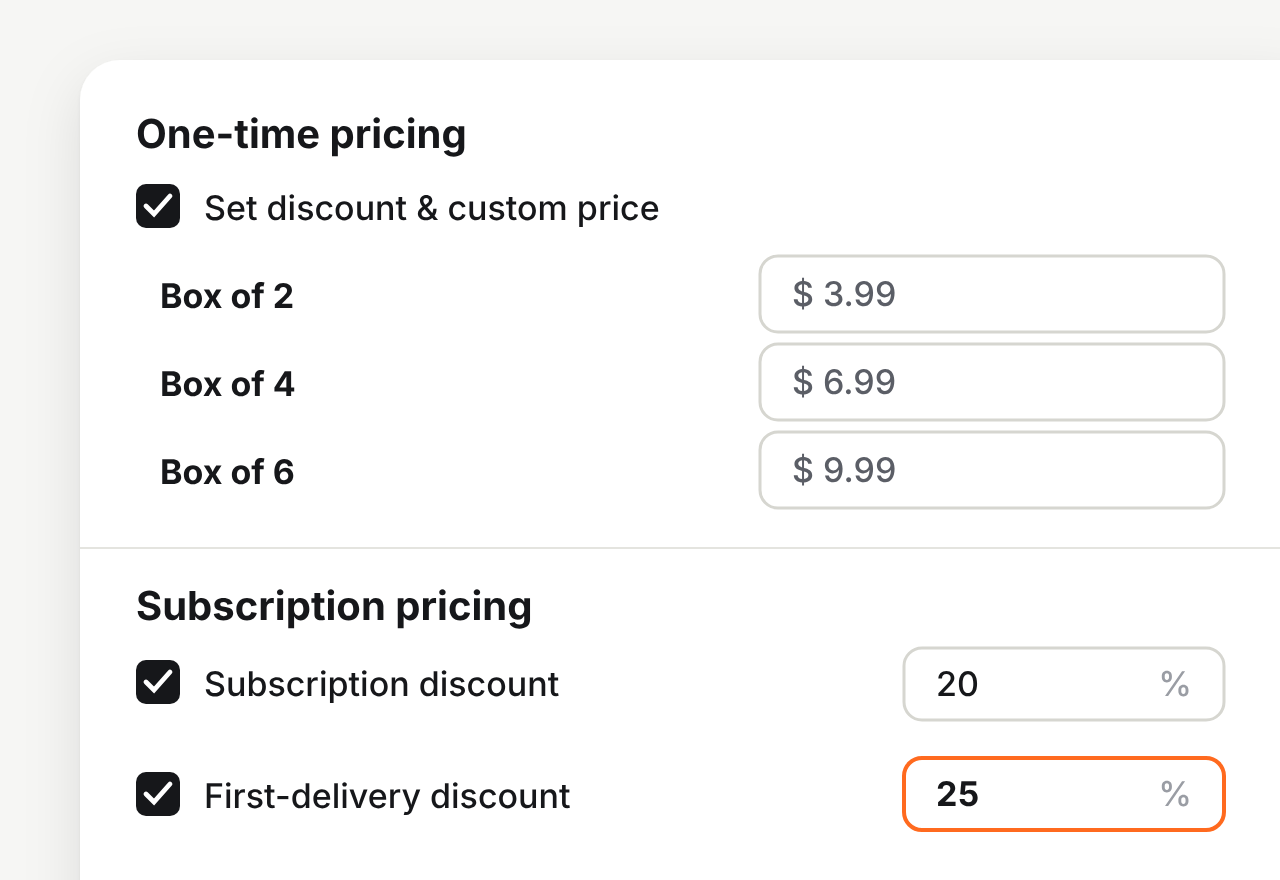
You set what subscribing is worth
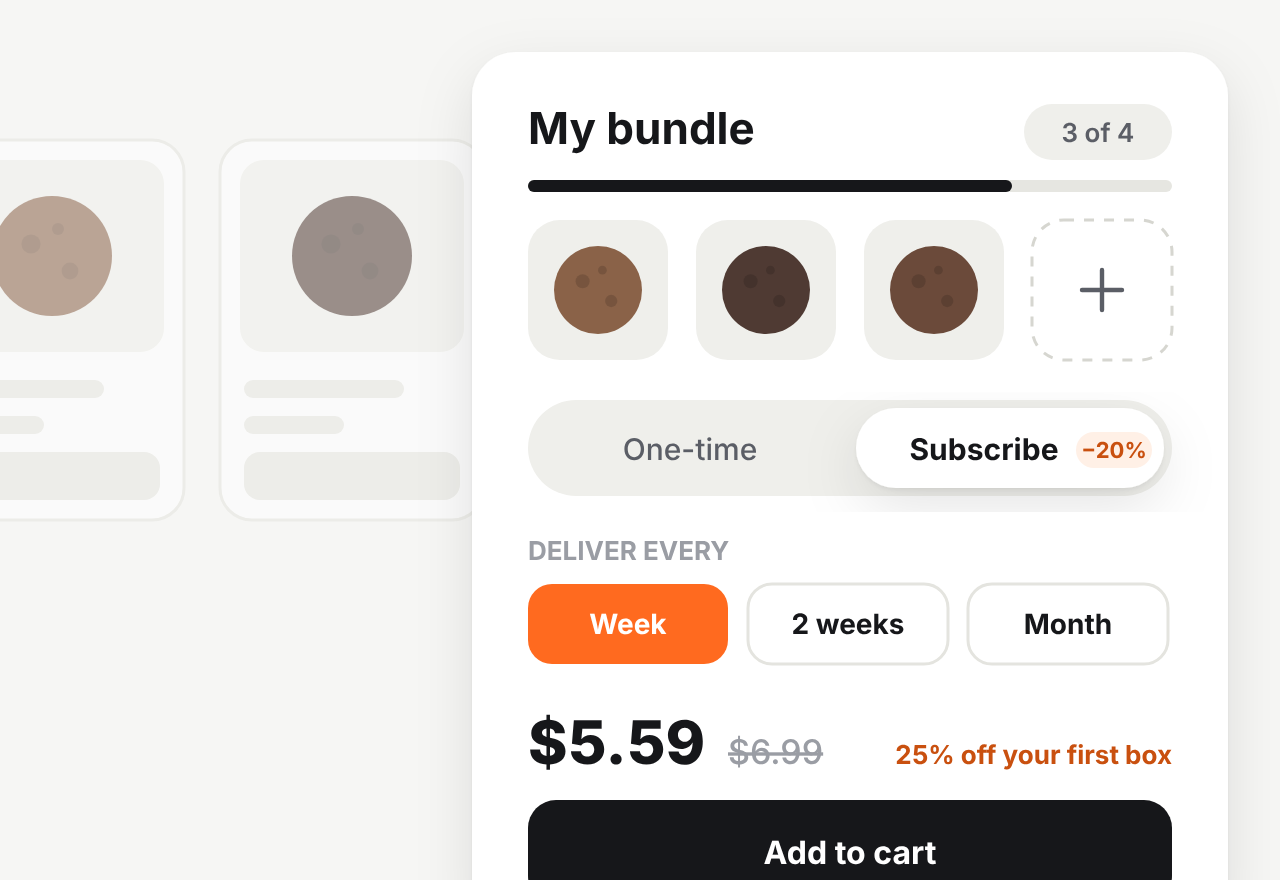
One discount for subscribers, and optionally a bigger one on the first box. That first-box discount is the Black Friday lever: generous once, without following you into every delivery after.
Shoppers choose their own schedule
Weekly, every two weeks, monthly — whatever fits how fast your product runs out. The saving sits right next to the price, so they can decide on the spot.
You watch it from one screen
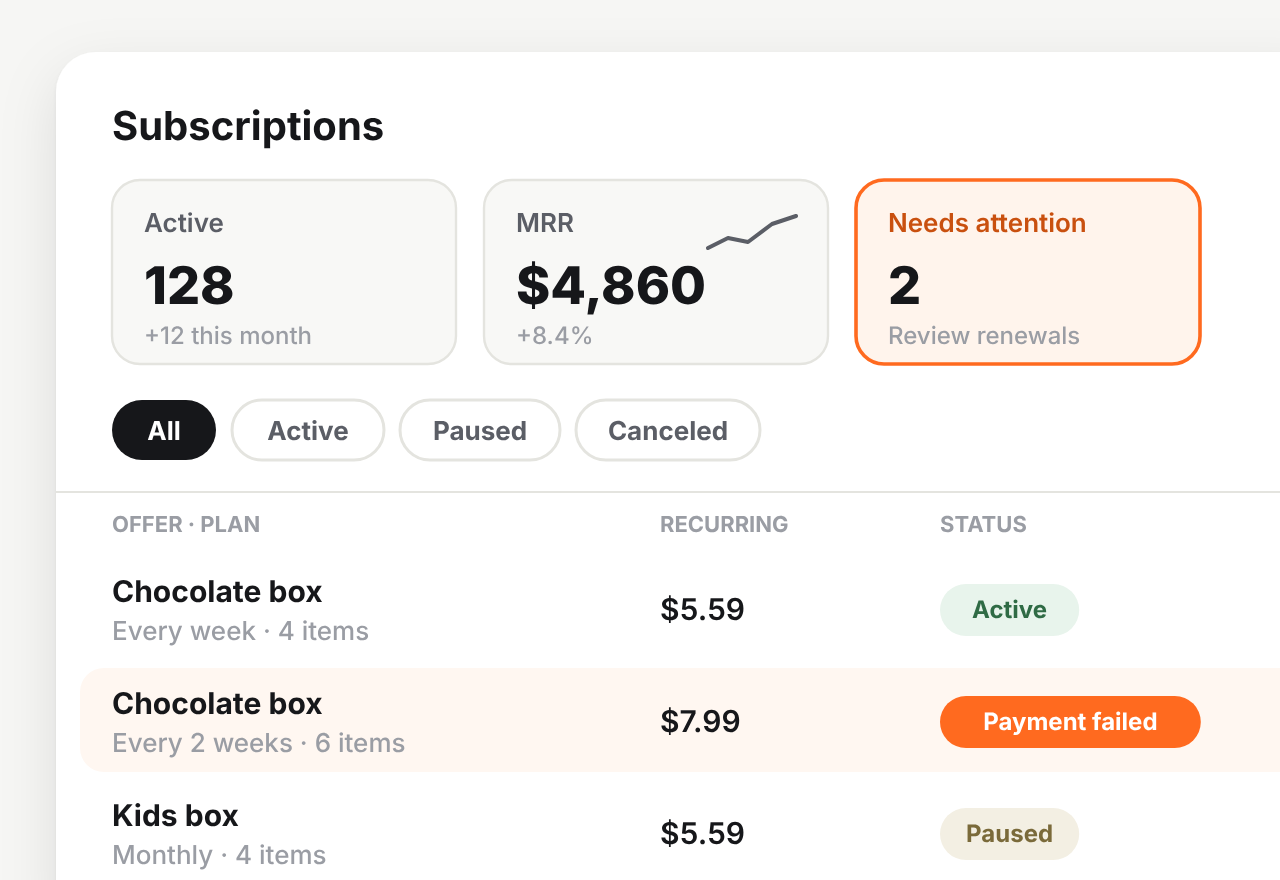
Active subscriptions, MRR, and a Needs attention list of subscriptions whose next charge is at risk. That last one is the only number I'd check daily — a failed renewal nobody noticed is how subscribers disappear.
Build-a-box ideas that work on subscription
The model fits best where people run out of something on a schedule and have opinions about which version they get.
- Supplements and wellness. Protein, greens, electrolytes. Predictable refill cycle, and everyone’s stack is different — which is exactly why a fixed box annoys people.
- Coffee and tea. A daily ritual with real preferences. Let people mix roasts and grind sizes, and add a mug or a tasting guide as a first-box gift.
- Pet food and treats. Replenishment with a loyal buyer. Different dog, different box.
- Snacks. Works for office and gifting as well as households, and the box size is the upsell.
- Skincare. High repeat rate, and people are loyal to their own routine rather than to your curation.
A note from a merchant conversation that stuck with me: the stores that do best here are the ones where the builder removes a chore, not the ones where it adds a game.
Whichever niche you’re in, the box has to work as a one-time purchase first — the usual bundle mistakes are worth a look before you put anything on repeat.
Do you need an app for a subscription box on Shopify
Shopify can’t charge a recurring order on its own — it needs a subscription app. The free Shopify Subscriptions app by Shopify does the billing part well: plans, contracts, automatic charges. What it doesn’t give you is the box.
That’s not an oversight. A subscription app puts a product on a plan, and a build-a-box order has no fixed product — every subscriber’s box is a different combination. Something has to build the box first.
| Shopify Subscriptions (free) | MW Bundle Builder | |
|---|---|---|
| Recurring billing and checkout | Yes | Yes (on Shopify’s own subscription contracts) |
| Customer builds the box | No | Yes |
| Per-box pricing and discounts | Basic percentage per plan | Bundle discount, fixed box price, separate subscriber discount |
| Free gift inside the box | No | Yes, first delivery only or every delivery |
| Skip, pause, cancel in customer accounts | Yes | Yes |
| Price | Free | $14.99/month, 14-day trial |
So: if you sell one or two products on a recurring plan, the free app may be all you need, and I’d rather you used it. If you want people to build their own box, that’s where we fit.
How to set up a build-a-box subscription on Shopify
Seven steps, about fifteen minutes. The pictures above use a cookie shop as the example — your categories, box size and schedules will be different.
Create the Mix & Match offer
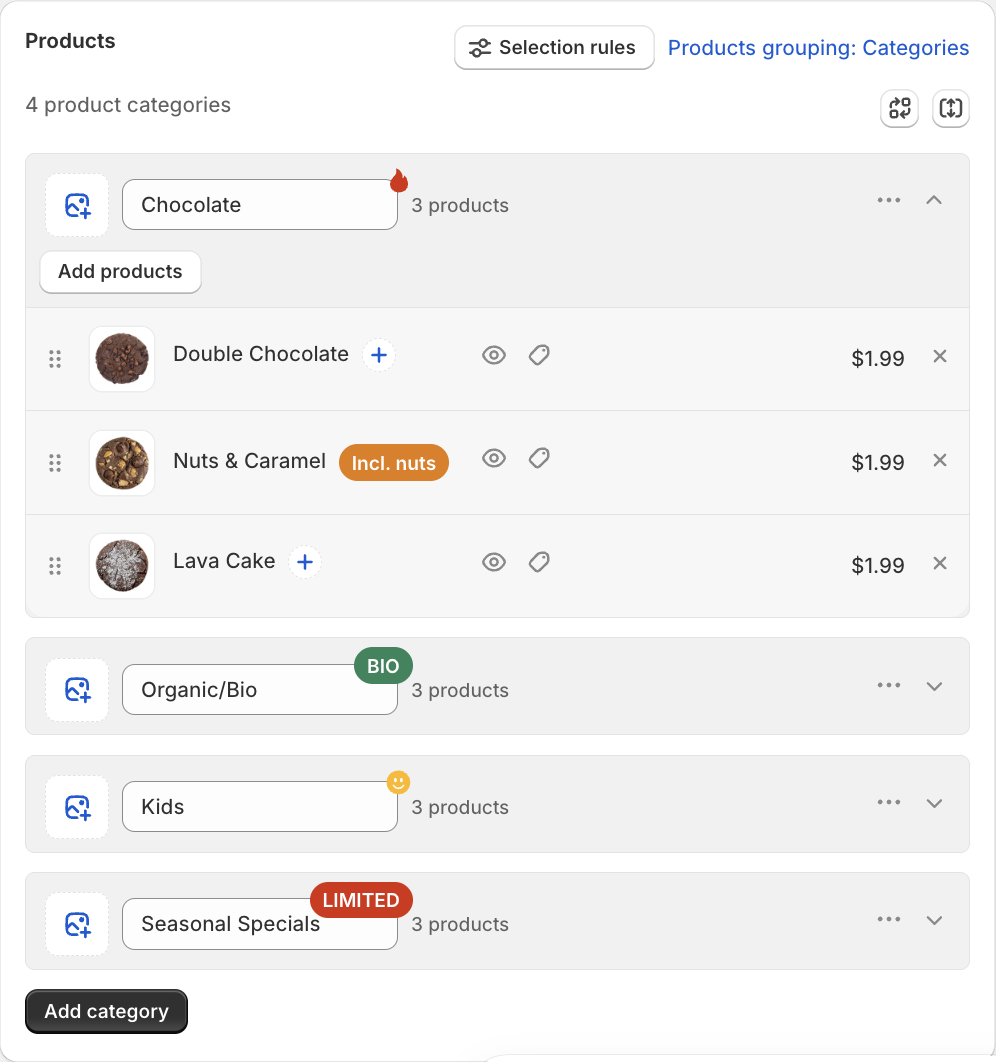
Create a Mix & Match offer and add the products customers can pick from. Group them into categories if that makes choosing easier.
This mix and match bundle is your box — in step 3 you let shoppers buy it once or on subscription.
Decide how big the box is
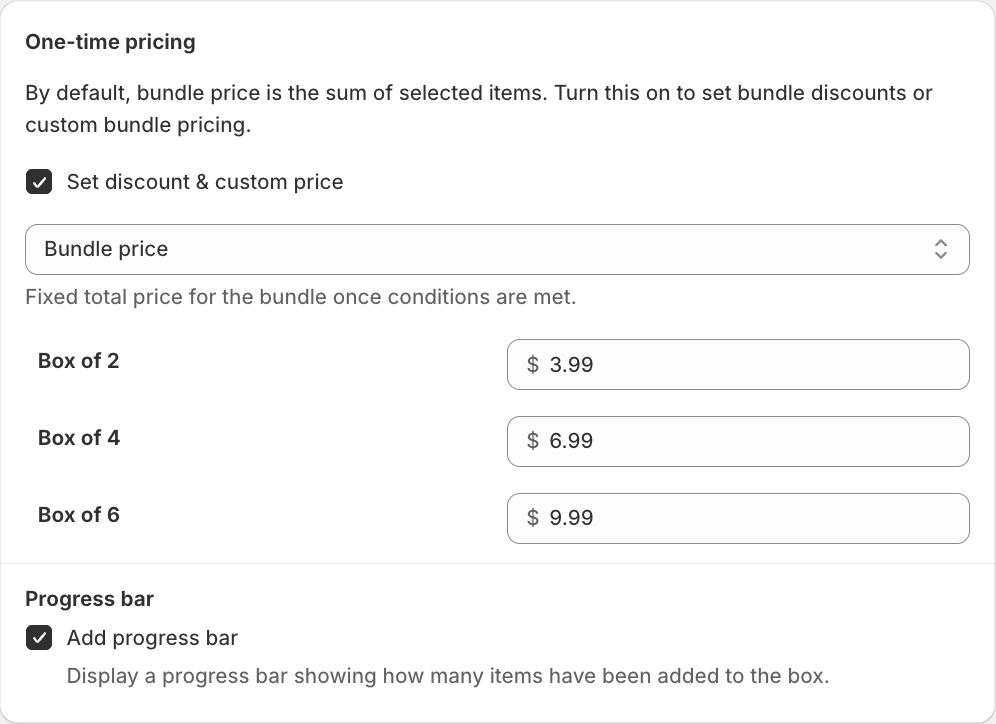
Leave it open, set a minimum and maximum, or offer fixed box sizes. Fixed sizes are worth a look if your packaging and shipping are priced per box.
Turn subscriptions on
Open Purchase options and pick one of three: One-time only, One-time & subscription, or Subscription only. Start with the middle one and let shoppers choose.
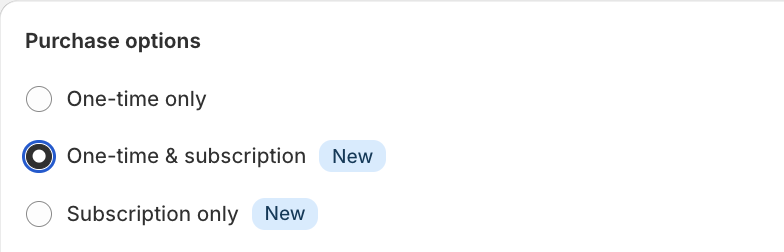
Add the delivery frequencies
Under Subscription frequency, add the schedules people can pick. A frequency is an interval — day, week or month — plus a count, so every week, every 2 weeks and every month all work. Set one as the default subscription frequency.
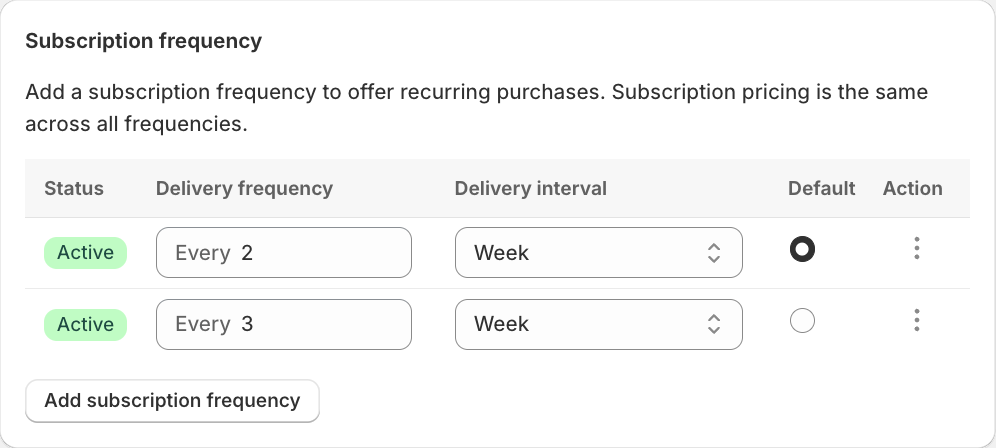
Keep the list short. Every extra option is one more decision before someone can buy.
Set the subscriber discount
One percentage off for subscribers, applied to every frequency, replacing the one-time bundle discount rather than adding to it. You can also set a separate first delivery discount — a bigger one, just for the first box.
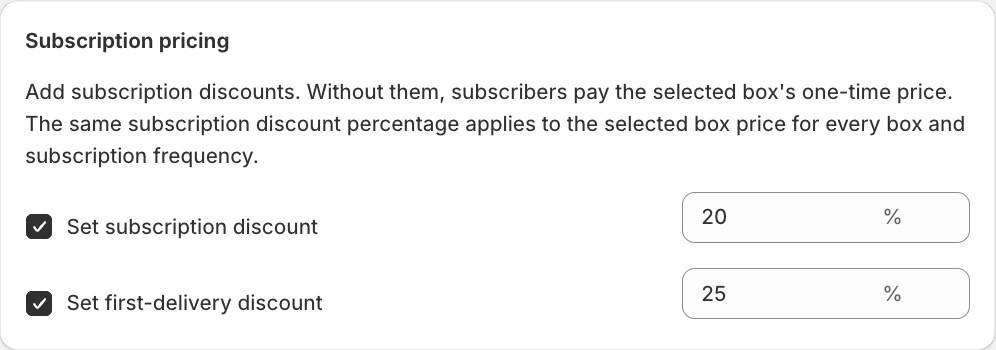
Decide what happens with free gifts
If the offer gives free gifts at a box size or spend threshold, choose whether subscribers get them on the first delivery only or on every delivery. First delivery only is usually safer: a welcome gift gets people to subscribe, a gift in every box comes out of your margin forever.
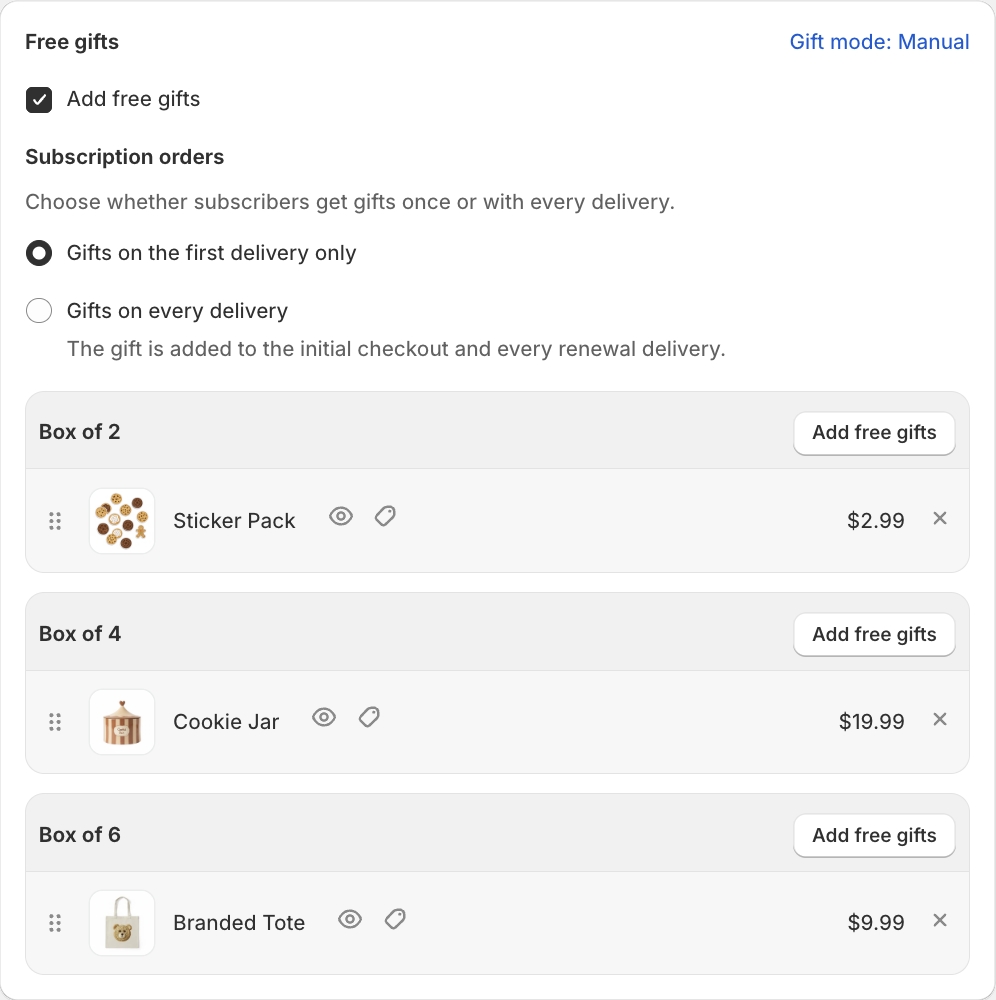
Check what the shopper sees
The builder now shows both prices, the schedules you added, and the total per delivery.
Subscription boxes go into the cart as separate lines rather than one bundle line. That's how Shopify handles subscriptions, not a setting you can change.
What your subscribers can do themselves
Subscribers manage their box from the subscriptions page in Shopify’s customer accounts — the same login they already use for orders. From there they can:
- see the next charge date and upcoming deliveries
- skip a delivery
- pause the subscription and resume it later, with their items and discount kept
- cancel
- update their card
- edit the delivery address
- check their order history, skipped deliveries included
If you get stuck, write to us
If something doesn’t behave the way this article says, or you’re not sure which pricing setup fits your store, send us a message. We read everything, we’ll help you set it up, and honestly, half of what we build comes out of those conversations.
Build your first subscription box
MW Bundle Builder: build-a-box, mix & match and subscription boxes in one app. No code.
Try it free on Shopify 14-day free trialQuestions merchants ask me
How do I create a subscription box on Shopify?
You need recurring billing and, if customers choose what goes in, a box builder. In MW Bundle Builder you create a Mix & Match offer, set box sizes and prices, turn on One-time & subscription, add delivery frequencies and set a subscriber discount.
Can I sell a build-a-box subscription on Shopify without an app?
No. Shopify needs a subscription app for recurring billing, and nothing in Shopify lets a customer build a box. The free Shopify Subscriptions app handles recurring charges for a fixed product; building the box needs a bundle app.
Does the customer pick new products for every delivery?
No. The box they built repeats as it is, on the schedule they chose. They can skip, pause or cancel from their account. Letting subscribers swap items between deliveries is something we want to add, and it isn't there yet.
What happens if an item in a subscription box goes out of stock?
The subscription shows up under Needs attention before the renewal, so you can restock or edit the box. Stock problems and payment failures are handled separately — an in-stock box with a declined card still goes through the payment retries.
Can subscribers get a bigger discount than one-time buyers?
Yes, as long as the offer uses a flat bundle discount or a fixed box price — just set the subscriber percentage higher than the one-time one. If your box is priced with quantity tiers instead (more items, bigger discount), subscriptions aren't available on that offer yet. Two merchants asked for that combination in the same week, so we're building it now.
How big should the subscriber discount be?
Big enough to notice, small enough that you'd be happy paying it every month for a year. Start lower than feels right — you can raise it, but taking a discount away from existing subscribers is a conversation you don't want.
Which plan is this on?
Subscription boxes are included in the Premium plan at $14.99/month, with a 14-day free trial. Development stores use it free.
Vitali leads Mageworx with sharp ideas and eCommerce expertise. Always innovating, he finds smart solutions—except when he's busy pretending not to work.


