How to Sell by Length on Shopify: Price per Foot, Yard or Meter
 Vitali6 min read
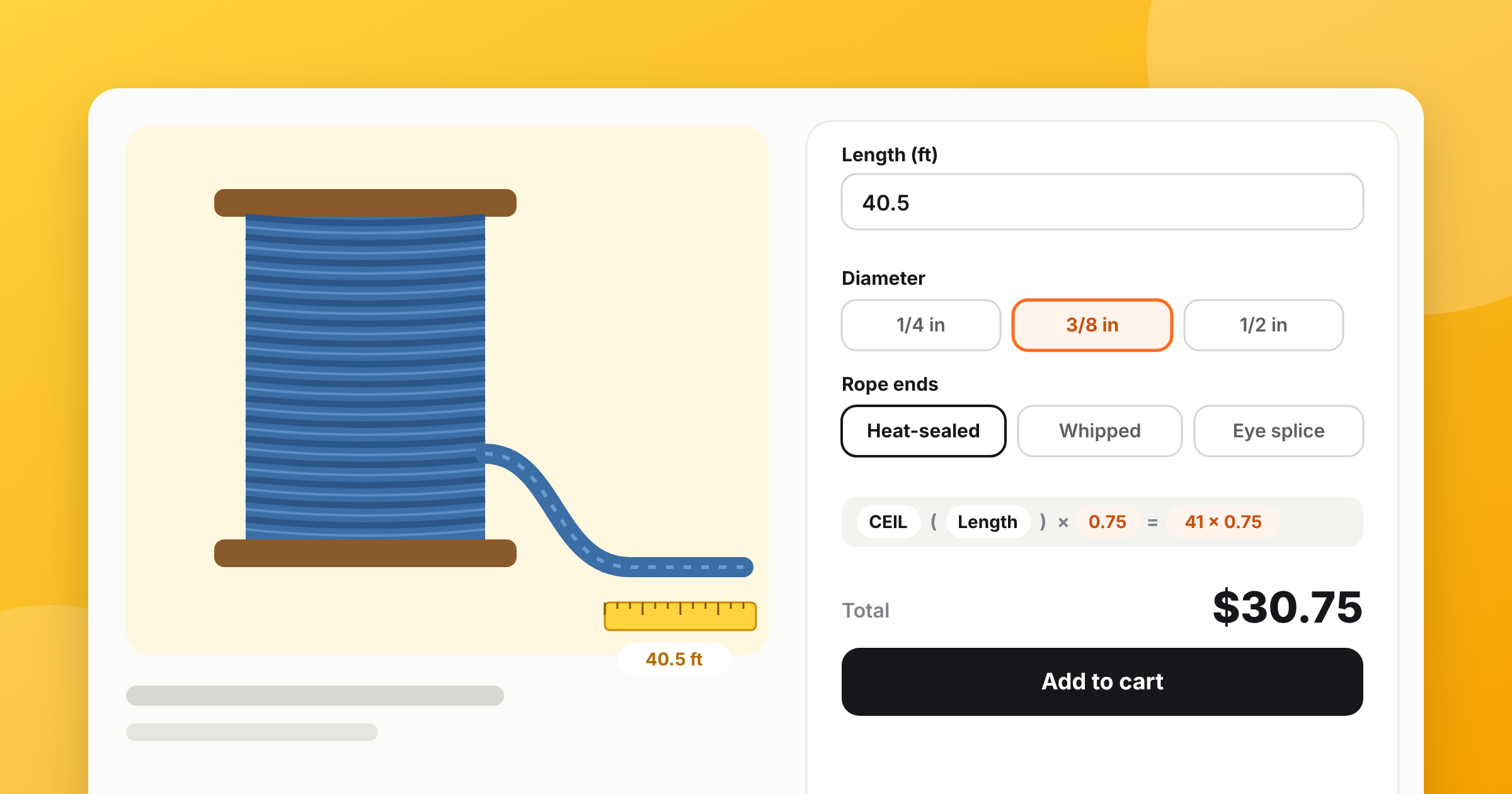
To sell by length on Shopify, add a length field to the product and price it per unit instead of creating a variant for every length. With APO Product Options, a Step counter with a price per foot is enough for simple cases. A Number field with a formula adds the rest: CEIL to charge whole units, MAX for a minimum cut, a different rate per material and a lower price per foot for long cuts.
Rope, cable, chain, fabric, ribbon, LED strip, edging — anything you cut from a spool or a roll has the same problem on Shopify: the customer wants 37 feet, and Shopify only knows products and variants. This guide shows the three ways merchants work around it, why two of them break, and how to set up proper length pricing step by step. The running example is braided rope sold by the foot from our demo store; the same setup works per yard or per meter.
Why variants and the quantity trick don’t work
Variants. You can create “10 ft”, “25 ft”, “50 ft” and so on. It works for a few standard lengths, but not for “any length up to 600 ft in half-foot steps”, and every diameter or color multiplies the list.
Quantity as length. Price the product at $0.75 and tell customers that quantity 40 means 40 feet. It’s free, and it’s fragile:
- the quantity box also means “how many pieces” — a customer who needs two 40 ft pieces can’t say so;
- there’s no minimum cut or whole-unit rounding unless you add more apps;
- cart, order and packing slip say “× 40”, and your team has to remember that it means feet;
- decimals don’t exist: 12.5 ft is either 12 or 13.
A length field keeps the quantity box for what it’s meant for: one 40 ft cut, or two of them.
Option 1. A step counter with a price per foot
The quickest setup doesn’t need a formula. In APO, go to Option sets, add a Step counter option called “Length (ft)” and set:
- the price of its value to your rate — $0.75;
- Step to 1, and the minimum and maximum you can cut, with Validate range turned on;
- the product price in Shopify to $0, or to a cutting fee you charge on every order.
The customer picks 40, and APO adds 40 × $0.75 = $30 to the product price. This works on the Starter plan.
One rate per product and whole feet only. As soon as you need half feet, a minimum charge, different rates for different diameters or cheaper long cuts, switch to a Number field and a formula.
Option 2. A length field with a formula
Step 1. Add the length field
Add a Number field option, “Length (ft)”:
- put the unit in the title — “Length (ft)”, “Length (yd)”, “Length (m)”;
- set the minimum and maximum, 1 to 600 ft in our demo;
- set the step: 0.5 for half feet, 0.1 for tenths of a meter;
- make it required.
Step 2. Give each material its own rate
Most length products come in several sizes or materials at different prices per foot. Add a Diameter option with buttons, turn on Enable formula-based pricing and enter each value’s rate in Calculation variables:
| Diameter | Calculation variable (price per ft) |
|---|---|
| 1/4 in | 0.45 |
| 3/8 in | 0.75 |
| 1/2 in | 1.20 |
Step 3. Build the formula
Open the Calculations tab, add a formula and use the result as Increase price $:
Length * Diameter
40 ft of 3/8″ rope is 40 × 0.75 = $30. One option set now prices every diameter and every length, and you can assign it to all your rope products.
Charge whole feet, yards or meters
If the field takes half feet but you cut and charge by the full foot, wrap the length in CEIL — it rounds any part of a unit up:
CEIL(Length) * Diameter
| Customer enters | Length * Diameter |
CEIL(Length) * Diameter |
|---|---|---|
| 40 ft | $30.00 | $30.00 |
| 40.5 ft | $30.38 | $30.75 (41 ft) |
FLOOR does the opposite and charges only complete units. Use it when you’d rather round in the customer’s favor.
Half-yard steps. Fabric is often sold by the half yard. Multiply the length by 2, round up, and divide back: CEIL(Length * 2) / 2 * 14. At $14 per yard, a customer who asks for 2.3 yards pays for 2.5 yards — $35.00.
Set a minimum cut
Two ways, depending on what you want the customer to see:
- A field minimum — set the Number field’s minimum to 10. Nobody can enter less.
- A minimum charge — keep the field minimum at 1 and charge at least 10 ft with
MAX:MAX(CEIL(Length), 10) * Diameter. A 6 ft order of 3/8″ rope costs $7.50, the price of 10 ft.
The second one sells short pieces too, and the cutting time is still paid for.
Make long cuts cheaper per foot
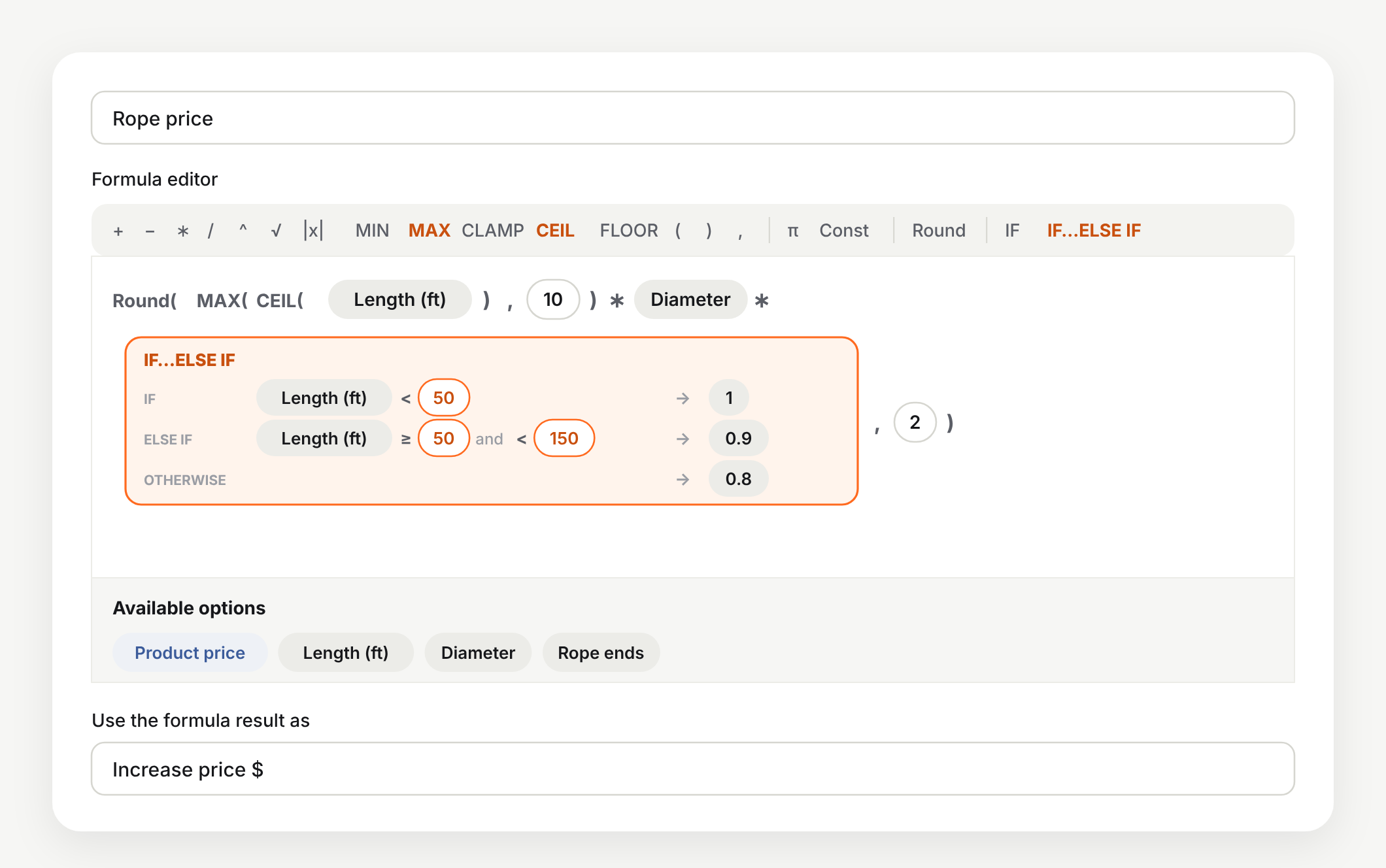
Spool sellers usually give a better rate on long cuts. Multiply the rate by an IF…ELSE IF block that checks the length:
| Row | Condition | Multiplier |
|---|---|---|
| IF | Length < 50 | 1 |
| ELSE IF | Length ≥ 50 and < 150 | 0.9 |
| Otherwise | 0.8 |
The full formula from our demo, rounded to cents:
Round(MAX(CEIL(Length), 10) * Diameter * IF…ELSE IF(…), 2)
| Order | Calculation | Rope price |
|---|---|---|
| 6 ft, 3/8″ | 10 ft minimum × $0.75 | $7.50 |
| 40.5 ft, 3/8″ | 41 × $0.75 | $30.75 |
| 80 ft, 3/8″ | 80 × $0.75 × 0.9 | $54.00 |
| 200 ft, 3/8″ | 200 × $0.75 × 0.8 | $120.00 |
| 120 ft, 1/2″ | 120 × $1.20 × 0.9 | $129.60 |
The rows are checked from top to bottom and the first match wins, so 50 ft falls into the second row only.
With a discount per foot, a longer cut can cost less than a shorter one: 49.5 ft of 3/8″ rope is $37.50, 50 ft is $33.75. That's how quantity tiers work, and many customers will simply round up. If you'd rather avoid it, use smaller steps between tiers or a fixed fee per tier instead of a multiplier.
Keep fixed extras outside the formula
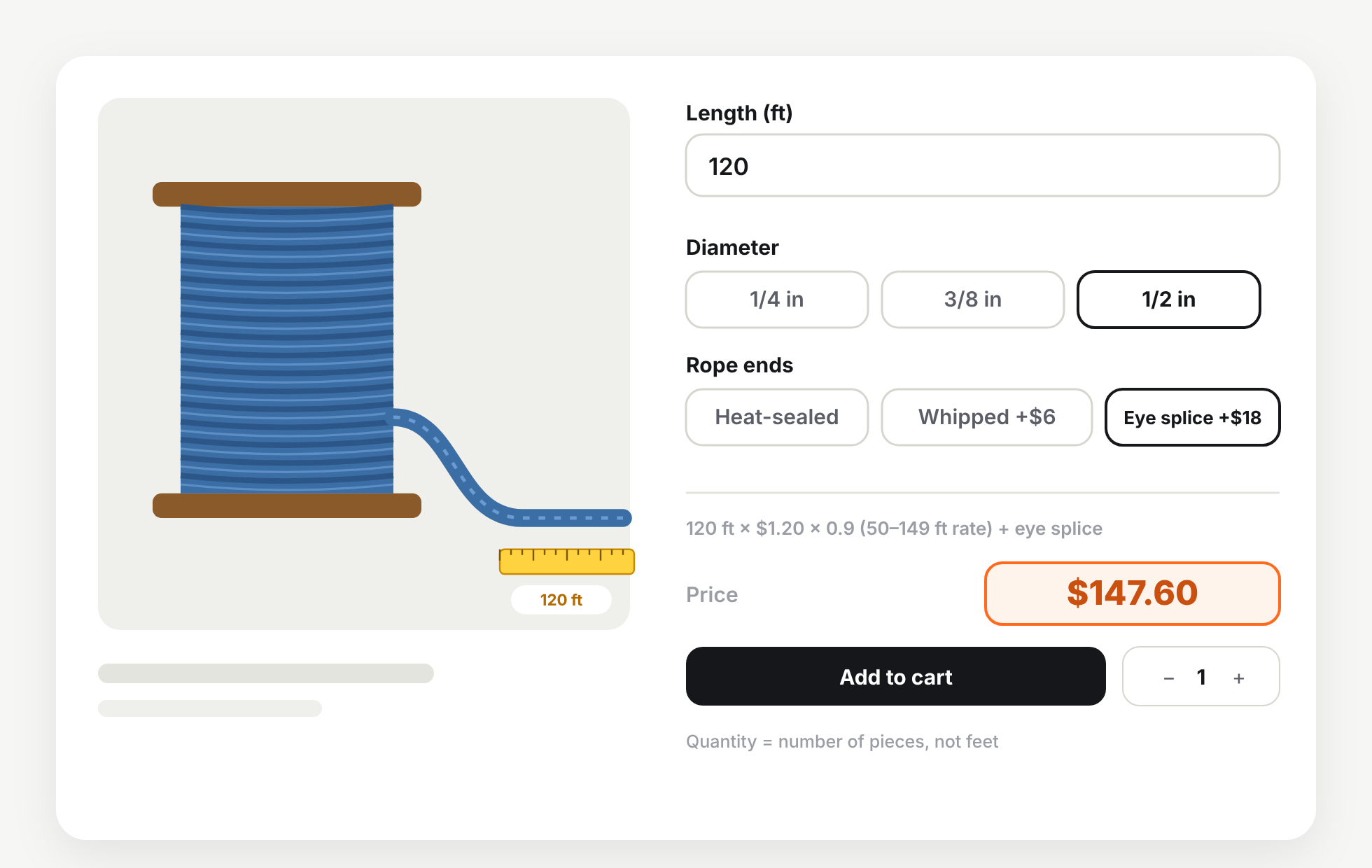
Things that cost the same on any length — whipped ends, an eye splice, connectors on an LED strip, a clasp on a chain — are ordinary option values with a fixed price. In our demo, Rope ends has Heat-sealed ($0), Whipped ends (+$6) and Eye splice (+$18). APO adds them on top of the formula result.
So 120 ft of 1/2″ rope with an eye splice on a product priced at $0 comes to $129.60 + $18 = $147.60. If the customer sets the quantity to 2, they get two identical cuts at $295.20.
Same setup, other products
| Product | Length field | Formula |
|---|---|---|
| Fabric by the yard | Length (yd), step 0.25 | CEIL(Length * 2) / 2 * Fabric — half-yard steps, rate per fabric |
| Ribbon or trim by the meter | Length (m), step 0.1 | Round(Length * Ribbon, 2) |
| LED strip | Length (m), step 0.5 | Length * Strip type + connector kit as a fixed-price value |
| Chain by the foot | Length (ft), step 1 | MAX(Length, 2) * Finish + clasp as a fixed-price value |
| Edging or trim by the cm | Length (cm), step 1 | Length * 0.06 — rate per centimeter |
Our guide to formula-based pricing on Shopify covers everything else a formula can use — minimum and maximum prices for the whole result, conditions and the product’s own price. If you price made-to-order products by size with percentage surcharges, see made-to-order pricing on Shopify.
Set it up with an AI agent
Our rope demo — the length field, diameters with their rates, rope ends and the formula with tiers — was built by Claude through APO’s MCP server from a short description. On the Scale plan you can connect Claude or ChatGPT the same way and ask it to add a diameter, change a tier or copy the setup to your other spools. You check the result in the app before it goes live.
Wrap-up
Selling by length on Shopify comes down to a length field and a price per unit. Start with a step counter if one rate and whole units are enough; move to a Number field and a formula when you need half units, a minimum cut, rates per material or cheaper long cuts. Test a few lengths against your price list before you go live — and leave the quantity box for “how many pieces”.
Sell any length without a variant for each
APO Product Options: length fields, a price per foot, yard or meter, minimum cuts and cheaper long cuts.
Try it free on Shopify 14-day free trial · formulas on the Growth planQuestions merchants ask me
How do I sell by the meter or foot on Shopify without a variant for every length?
Add a length field to the product with an options app and price it per unit. In APO Product Options, a Step counter with a price per unit multiplies that price by the length the customer picks. For decimals, minimums, material rates or cheaper long cuts, use a Number field and a formula like Length × rate.
Can I charge only for whole meters or feet?
Yes. Wrap the length in CEIL to round any part of a unit up: CEIL(Length) × 0.75 charges 40.5 ft as 41 ft. To sell in half-yard steps, use CEIL(Length × 2) / 2 × rate.
Can I set a minimum length?
Set a minimum on the field so nobody can type less, or keep a low field minimum and charge at least a set length with MAX: MAX(CEIL(Length), 10) × rate charges a 6 ft order as 10 ft.
Can the price per foot drop for longer cuts?
Yes. Multiply the rate by an IF…ELSE IF block that checks the length: full price under 50 ft, 10% off from 50 ft, 20% off from 150 ft. The first row that matches wins.
Does APO track my stock in feet or meters?
No. Shopify counts stock per item, so a cut of any length is one item. Most length sellers track stock by the spool, roll or bolt and adjust it when they open a new one.
Which APO plan do I need to sell by length?
A Step counter with a price per unit works on the Starter plan ($14.99/month). Formulas — rounding, minimums, material rates and length tiers — are on the Growth plan ($34.99/month). Both come with a 14-day free trial.
Vitali leads Mageworx with sharp ideas and eCommerce expertise. Always innovating, he finds smart solutions—except when he's busy pretending not to work.